

TL;DR:
- Agentic AI security runs scanning, remediation, compliance mapping, and architecture analysis from one natural-language prompt, chaining tools like Gitleaks, Semgrep, and Trivy instead of requiring a developer to run each one separately.
- The agent doesn’t just flag a vulnerability; it generates the fix (a parameterized query, a masking function, a pinned action reference) and shows the diff before writing anything to disk.
- Opsera Security Scan Agent run against an open-source firmware repo returned 134 findings and a 94.1/100 Critical Risk score in minutes, with file- and line-level fixes for issues such as GitHub Actions shell injection and secrets: inherit misuse.
- Before trusting any agentic security tool, check five things: does it run inside the existing IDE/CI pipeline, does it show a diff before applying a fix, does code stay local, does output map to compliance controls, and can scans be scoped to one directory or severity level.
A security engineer opens four terminals before breakfast: one for Gitleaks, one for npm audit, one for Semgrep, one for Trivy. Each tool outputs a different report format. Consolidating four separate reports into a single findings list takes around 90 minutes. By the time the findings are ready, the PR has already been merged, defeating the purpose of the merge gate.
Agentic AI security replaces that four-terminal routine with a single natural-language prompt. An agent reads the prompt, decides which scanners to run, executes them in sequence, parses each report, and returns one prioritized findings list, inside the same IDE window the developer was already using.
This post covers what agentic AI security actually does inside a security workflow, what to check before trusting a tool built this way, and a real scan run against a 100,000-line open-source firmware repository, with the exact findings the agent returned. Understanding how an agent can drive that whole sequence starts with what “agentic” actually means for a security workflow.
What Agentic AI Security Means for a Security Team
Agentic AI security is the use of autonomous, tool-calling AI agents to run security tasks such as scanning the codebase, suggesting remediation, compliance mapping, and architecture analysis, from one prompt instead of a sequence of manual steps.
The distinction from “AI-assisted security” is the tool-calling part. A chatbot that explains what a CVE means is assisting a human who is still driving the process. An agent that receives the prompt “scan this repo,” decides Gitleaks needs to run before Semgrep, executes both, parses the JSON output, and writes a prioritized report is driving the process itself, checking back with the human only at defined decision points.
That decision-making step is where an agent stops being a script and needs its own definition of “agentic”.
What Separates an AI Agent from a Traditional Security Scanner
A traditional SAST tool runs a fixed command against a fixed target and returns a fixed report format. Point Semgrep at a directory, and it scans that directory with whatever ruleset was configured, whether or not that ruleset fits the language or framework in use.
An agentic security tool works from four traits instead of a fixed command:
- It parses a natural-language prompt to infer scan type, target directory, and severity threshold, rather than requiring command-line flags.
- It chains multiple tools in sequence: secrets detection, then dependency audit, then SAST, based on what it detects in the repo, rather than running one tool in isolation.
- It adjusts its next step based on what the previous tool returned. A tool-check failure changes the plan; a clean secrets scan does not stop the dependency scan from running.
- It stops at defined checkpoints, before skipping a missing tool, before applying a generated fix, and asks for explicit confirmation instead of proceeding silently.
Those four traits show up as five concrete capabilities once an agent is pointed at an actual codebase.
Five Security Tasks Agentic AI Now Runs Without Manual Steps
1. Runs Secrets, Dependency, and SAST Scans in One Command
Running a full security check manually means opening Gitleaks for exposed credentials, npm audit or pip-audit for CVEs in dependencies, Semgrep for injection and unsafe-pattern detection, and Trivy for container and IaC misconfiguration- four separate commands, four separate JSON outputs, and a manual step to merge them into one severity-ranked list.
An agentic scanner runs the same four tools from a single prompt like “scan this project for security issues.” It detects which tools apply based on the files in the repo: a package.json triggers npm audit, a Dockerfile triggers Trivy, runs each one, and normalizes the output into one report with a single risk score.
2. Writes the Fix, Not Just the Finding
A traditional SAST report tells a developer that line 42 of users.js has an SQL injection. It does not tell them what a parameterized query for that specific line looks like; that part is still the developer’s job.
An agentic remediation flow reads the vulnerable line, generates a parameterized replacement, and shows both versions side by side before asking for approval:
Vulnerable:
| query = “SELECT * FROM users WHERE id = ‘” + user_id + “‘” |
Fix:
| query = “SELECT * FROM users WHERE id = :user_id” params = {“user_id”: user_id} |
The developer reviews the diff and types “yes” or “no”. Nothing is written to disk without that confirmation.
3. Maps a Codebase Against SOC2, HIPAA, and GDPR Controls
A first SOC2 audit usually starts with a compliance officer manually walking through each of the roughly 105 Trust Service Criteria controls, checking whether MFA is enforced, whether access logs exist, whether encryption at rest is configured, a process that commonly takes two to three months for a mid-size engineering org.
An agentic compliance audit runs the same control checks against the live infrastructure and codebase, then returns a scored breakdown per framework, for example, 78% passing on SOC2, with the specific failing controls named (three users without MFA, five inactive accounts still active after 90 days) instead of a pass/fail summary.
4. Rebuilds Architecture Documentation From the Actual Codebase
Architecture diagrams go stale the first time a team adds a new microservice and doesn’t update the wiki. Six months later, the diagram shows a system that no longer exists, and a new engineer tracing a data flow has to read source code instead of the documentation meant to save them that work.
An agentic architecture agent parses the actual repository, package.json, Dockerfiles, Terraform files, API route definitions, and generates a current system diagram, API endpoint list, and data-flow map from what’s deployed, not from what someone remembered to document.
5. Finds and Masks PII Before a Query Ships to Production
A SELECT * on a customers table returns SSNs, emails, and credit card numbers in plaintext to anyone with query access, unless a developer remembers to add masking logic every time a new query touches that table.
An agentic SQL security agent scans queries for unmasked PII columns, generates masking functions (mask_ssn, mask_email, mask_credit_card), and rewrites the query to use them before the query reaches a shared branch.
Every time deadline pressure causes a team to skip one of those five tasks, security risk increases. Across hundreds of pull requests, that makes agentic AI security essential—not just convenient.
How Agentic AI Streamlines Compliance Audits in Weeks Instead of Months
A manual SOC2 readiness assessment for a mid-size SaaS company typically runs two to three months for scheduling interviews with each team lead, collecting evidence manually from a dozen systems, and writing up findings by hand. An agentic compliance audit collects the same evidence access logs, encryption settings, MFA enrollment directly from infrastructure APIs and returns a scored report in five to ten minutes, cutting audit-prep time from months to weeks rather than removing the compliance officer’s review from the process entirely.
The same shift applies to code review. A security engineer reviewing a 50-file PR by hand checks the files in the time they have before the sprint deadline, which usually means checking the files with the most visible diff, not necessarily the files carrying the highest risk. An agent scans all 50 files in the same pass regardless of deadline pressure, so a three-line change to an authentication check gets the same scrutiny as a 200-line refactor.
None of the automation described above replaces a security engineer’s judgment on an ambiguous finding, whether a flagged pattern is a real SQL injection risk or an intentional, already-sanitized query still requires someone who understands the surrounding code. What changes is how much of the repetitive detection work reaches a human before a deadline forces it to be skipped.
Speed and coverage only matter if the tool doing the scanning can be trusted with what it touches, which is where the evaluation gets specific.
Questions to Ask Before Trusting an Agentic Security Tool
Not every tool marketed as “agentic” behaves the same way once it’s inside a real codebase. Five questions separate a tool that fits into an existing workflow from one that adds a new dashboard nobody opens:
1. Does it run inside the IDE or CI pipeline already in use, or does it require a separate login?
A tool that only works through its own web dashboard adds a context switch every time a developer wants to check a file, the same friction that made manual four-tool scanning slow in the first place.
2. Does it show the diff before applying a fix, or does it write directly to disk?
A tool that silently rewrites a file removes the one checkpoint where a developer catches a fix that breaks an edge case the agent didn’t account for.
3. Does source code stay on the local machine, or does it get uploaded to a third-party server?
Sending a private repository’s source to an external server for analysis creates a new place that the source can leak from, on top of whatever risk the vulnerability itself represents.
4. Does the output include control IDs and remediation steps, or just a list of file names?
A findings list with no control mapping still leaves the compliance officer to manually cross-reference every finding against SOC2 or HIPAA control numbers by hand.
5. Can the scan be scoped to one directory, one severity level, or one framework, or does every run scan everything?
A tool that can only run a full-repo scan turns a two-minute pre-commit check into a fifteen-minute wait, which is long enough that most developers will skip it.
Opsera’s DevOps agent suite answers each of those five questions in a specific, checkable way, worth walking through before looking at what it actually returned on a real repository.
How Opsera Runs Agentic AI Security Inside the IDE
Opsera runs as an MCP connection inside Claude Code, Cursor, and VS Code, so a scan starts from the same terminal a developer already has open, not a separate portal.
Four agents cover the tasks described earlier:
- Security Scan Agent, Gitleaks, npm/pip dependency audits, Semgrep, and Trivy in one command, returning a single risk score instead of four separate reports.
- SQL Security Agent runs a 7-step scan-and-fix flow that shows the vulnerable query, the parameterized replacement, and a rationale, then waits for a yes/no before writing the fix to disk.
- Compliance Audit Agent scores a codebase against SOC2, HIPAA, PCI DSS, ISO 27001, and GDPR and returns a 6-week remediation roadmap ordered by control severity.
- Architecture Analyze Agent parses package.json, Dockerfiles, and Terraform files to generate current system diagrams and flag undocumented data flows.
Source code is analyzed on the local machine; only structured findings and metadata are sent back to the Opsera portal, answering the “does source code stay local” checklist question with a specific architectural choice rather than a claim.
Two of the five checklist questions- does it show the diff before applying a fix, and does the output include remediation steps rather than just file names- are easier to check against an actual scan than against a product description.
Scan Found 134 Findings in Meshtastic’s Firmware
To see what a scan-and-report cycle actually returns, here’s an unedited Opsera Security Scan Agent run against Meshtastic’s firmware repository, an open-source project on GitHub, not a demo repo built to produce clean results.
The prompt:
| Run a security scan on this project using Opsera |
Before running anything, the agent asked which directory to scan, which scan type to run, and what severity threshold to report, then checked that Semgrep was installed before starting a confirmation step that matches the “shows the diff before acting” and “doesn’t proceed silently” criteria from the checklist above.
The result:
| Critical: 27 High: 104 Medium: 0 Low: 3 Total: 134 |
| Risk Score: 94.1/100, Critical Risk |
Here is how that same score renders inside the generated report, with the formula that produced it shown next to the gauge:
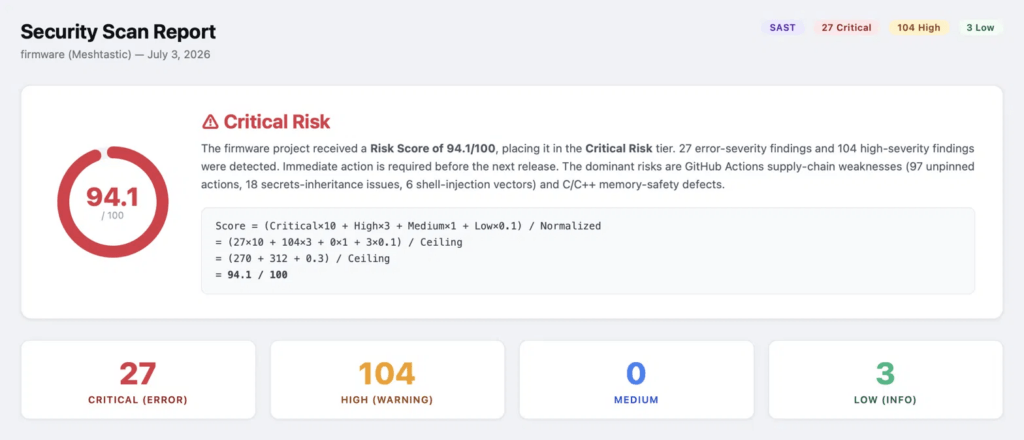
The report doesn’t just show the number; it shows the math behind it, and names the two dominant risk drivers directly under the gauge: GitHub Actions supply-chain weaknesses (97 unpinned actions, 18 secrets-inheritance issues, 6 shell-injection vectors) and C/C++ memory-safety defects.
Two of the 27 critical findings show what the fix-generation step looks like on a file.
Finding: run-shell-injection, six instances. GitHub Actions run: steps interpolate ${{ github.* }} context values directly into shell commands. Anyone who controls a PR title or branch name can inject arbitrary shell commands that execute with the workflow’s permissions:
| yaml # Vulnerable, .github/actions/build-variant/action.yml:73 – run: echo “Building ${{ github.event.pull_request.title }}” # Fixed – env: PR_TITLE: ${{ github.event.pull_request.title }} run: echo “Building $PR_TITLE” |
Finding: secrets-inherit, eighteen instances. Reusable workflows in daily_packaging.yml and docker_manifest.yml use secrets: inherit, which passes every secret the parent workflow has access to into the child workflow, including secrets the child workflow never uses:
| yaml # Vulnerable uses: ./.github/workflows/build.yml secrets: inherit # Fixed uses: ./.github/workflows/build.yml secrets: SIGNING_KEY: ${{ secrets.SIGNING_KEY }} |
The same before/after format applies to every one of the 134 findings, including memory-safety issues in the firmware’s C/C++ code, a null pointer dereference in the HTTP server component, and a path traversal bug due to unsanitized input. How those two look inside the generated report, each with the affected file, line number, and a remediation code block already written out:

The report names the exact library calls involved (malloc, fopen, getenv) and the exact line numbers (PiWebServer.cpp:172, PortduinoGlue.cpp:502) rather than a generic “null pointer risk” label; the same file-and-line specificity carries through all 134 findings, not just the two shown here.
The agent’s STRIDE breakdown named Tampering as the largest category at 109 of 134 findings, driven mainly by 97 instances of GitHub Actions referencing a mutable tag (actions/checkout@v4) instead of a pinned commit SH, a supply-chain gap where the action’s maintainer, or anyone who compromises the maintainer’s account, can silently swap in different code behind the same version tag.
The remediation roadmap split the 134 findings into three tiers: four quick wins resolvable in under a day (replacing secrets: inherit with an explicit secret list, switching memset to explicit_bzero in two crypto files), four sprint-level fixes with two-week estimates, and a quarterly item recommending Dependabot or Renovate to automate SHA-pinning across all 97 unpinned action references.
Both a Markdown and an HTML version of the report were generated and saved directly to the project directory, with the HTML version uploaded to Opsera’s portal and a link returned in the same terminal session. Here’s what that full session looks like inside Claude Code, from the original prompt to the completed telemetry upload:
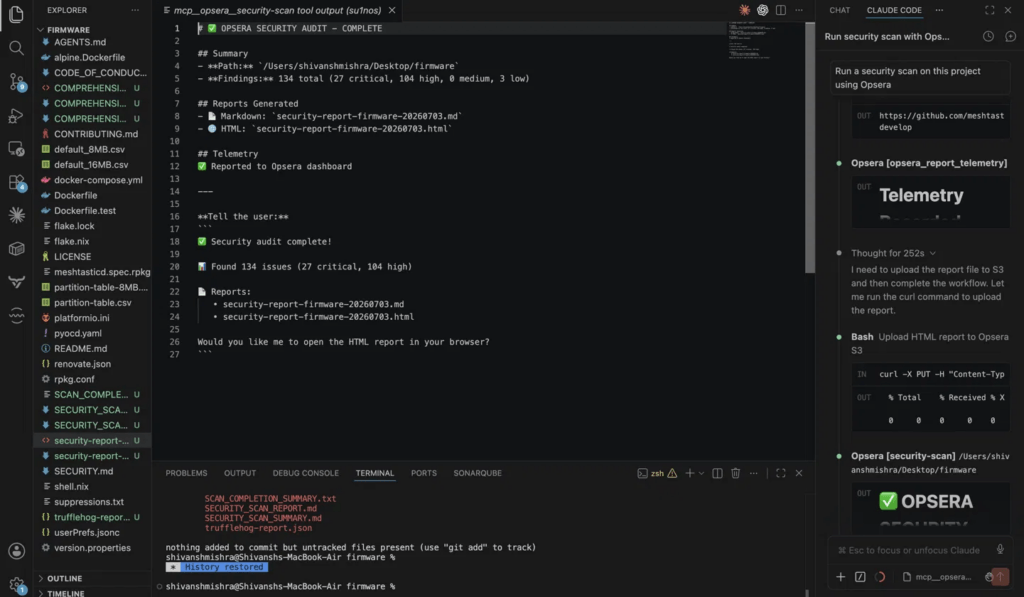
The whole exchange (prompt, scan, telemetry upload, and final summary) happens in the chat panel next to the code editor, without a separate window or dashboard login. That scan also shows where the agent’s judgment ends and a human’s begins.
Where Agentic AI Security Still Needs a Human Reviewer
Risk Scores Still Require Context
A risk score of 94.1 on Meshtastic’s firmware does not mean the project is 94.1% likely to be breached. It means the weighted count of findings crossed the threshold that the scoring formula labels Critical.
Likewise, an agent cannot determine whether the 97 unpinned GitHub Actions belong to workflows your team owns or to trusted third-party actions. It can identify the pattern, but deciding whether each finding represents an acceptable risk still requires human judgment.
False Positives Need Manual Validation
False positives remain a reality, even with advanced AI-assisted scanning. For example, Semgrep’s don’t-call-system rule flagged a system() call in LinuxInput.cpp. While the pattern matched the rule, the command string was fully static and not influenced by user input, eliminating the command injection risk the rule was designed to detect. A security engineer still has to inspect the surrounding code to determine whether the finding is a genuine vulnerability or can be safely dismissed.
Humans Remain Accountable for AI-Generated Fixes
AI can suggest fixes, but it cannot own the consequences of applying them. For example, an automatically generated fix for a SQL injection vulnerability might introduce a subtle logic change that only breaks a query under a specific null-value edge case. Even when the workflow requires a diff review and approval, organizations must still define who is responsible for validating those changes before they reach production.
Securing the Agent Is a Separate Challenge
Agentic AI also introduces a new security consideration: protecting the agent itself. During the Meshtastic scan, each phase was driven by instructions from a trusted MCP server, including messages such as “Phase 2/6: Tool Check,” “MANDATORY USER CONFIRMATION,” and the JSON payload required for the next step. Those instructions are legitimate because they come from a verified source.
However, the same interaction model can be abused through prompt injection. An attacker can place malicious instructions inside an untrusted file, webpage, or pull request comment that an agent later reads during a scan. Distinguishing trusted tool instructions from untrusted external content is a separate security problem, one that exists independently of the vulnerabilities the agent is trying to detect.
Agentic AI Security Moves the Work From Periodic to Continuous
A security review that used to happen once a quarter, gated by whether anyone had time to run four separate tools and reconcile the output, can now run on every PR without adding to anyone’s manual workload. That’s the actual shift agentic AI security represents, not a smarter scanner, but a scanner that runs often enough to catch a shell-injection pattern before it merges instead of during the next scheduled audit.
The discipline is still forming. Which findings an agent can safely auto-fix without review, how much standing access an agent should have to production infrastructure, and how a team audits an agent’s own decision trail are questions most orgs are still working out case by case, not questions with a settled answer yet.
FAQs
What is the agentic AI security controls framework?
No single named framework. OWASP’s Top 10 for Agentic Applications (ASI01–ASI10), Databricks’ DASF agentic extension, and AWS’s Agentic AI Security Scoping Matrix are the main ones, and each publishes its own control set. All of them converge on the same five controls: least privilege, human-in-the-loop approval, sandboxed execution, input sanitization, and audit logging.
What are the main agentic AI frameworks?
For building agents: LangGraph, CrewAI, Microsoft AutoGen/AG2, Google ADK, and the OpenAI/Claude Agent SDKs are the ones with the most production adoption in 2026. None of them include built-in governance, approval gates, and audit trails have to be added separately.
What is the security of agentic AI systems?
It means protecting the agent from being manipulated, not using the agent to secure something else. The core risks per OWASP are prompt injection, tool misuse, memory poisoning, identity/privilege abuse, and cascading failures across multi-agent systems, countered by least privilege, sandboxing, and human approval gates.
Is Opsera an agentic AI security tool or a securing-agents tool?
Opsera is the former; it uses agents to run security tasks, not a tool that secures agentic systems themselves (that’s OWASP’s ASI Top 10 territory). Its four agents, Security Scan, SQL Security, Compliance Audit, and Architecture Analyze, run inside Claude Code, Cursor, or VS Code, analyze source code locally, and show a diff before writing any fix to disk. A scan against Meshtastic’s open-source firmware repo returned 134 findings, including 6 GitHub Actions shell-injection instances and 18 secrets: inherit violations, with a 94.1/100 risk score.
What are the 5 types of agentic AI?
Simple reflex, model-based reflex, goal-based, utility-based, and learning agents are classifications from classical AI theory still used for agentic systems today. Most production agents are hybrids of two or more of these rather than a pure single type.