Smart Model Selection: How Forge Matches Every Task to the Right AI Model
TL;DR
- Smart Model Selection in Forge by Opsera sizes each work order before any agent runs, then recommends the models that fit its complexity, context needs, and budget.
- Using one frontier model for every task wastes money: on Anthropic's price list, Claude Opus 5.5 input costs 40 times what Claude Haiku 5.5 charges.
- Each work order shows recommended models across providers, cheaper budget alternatives, and a token estimate, so you can see the cost before the run.
- The sizing works because of context. Forge's Knowledge Graph already knows the codebase, so it can judge how much reasoning a task needs.
- The recommendation travels with the work order into Cursor, Claude Code, or any connected editor through the Forge MCP server.
Most teams pick one AI model and use it for everything: a one-line config fix, a schema migration, a security patch. The result is predictable. Routine work runs on the most expensive model, hard work sometimes runs on one that is too small, and nobody sees the cost until the invoice arrives.
Forge by Opsera handles that choice per task. This short guide explains what Smart Model Selection does, how Forge sizes a task, and how teams use the recommendation.
What Is Smart Model Selection?
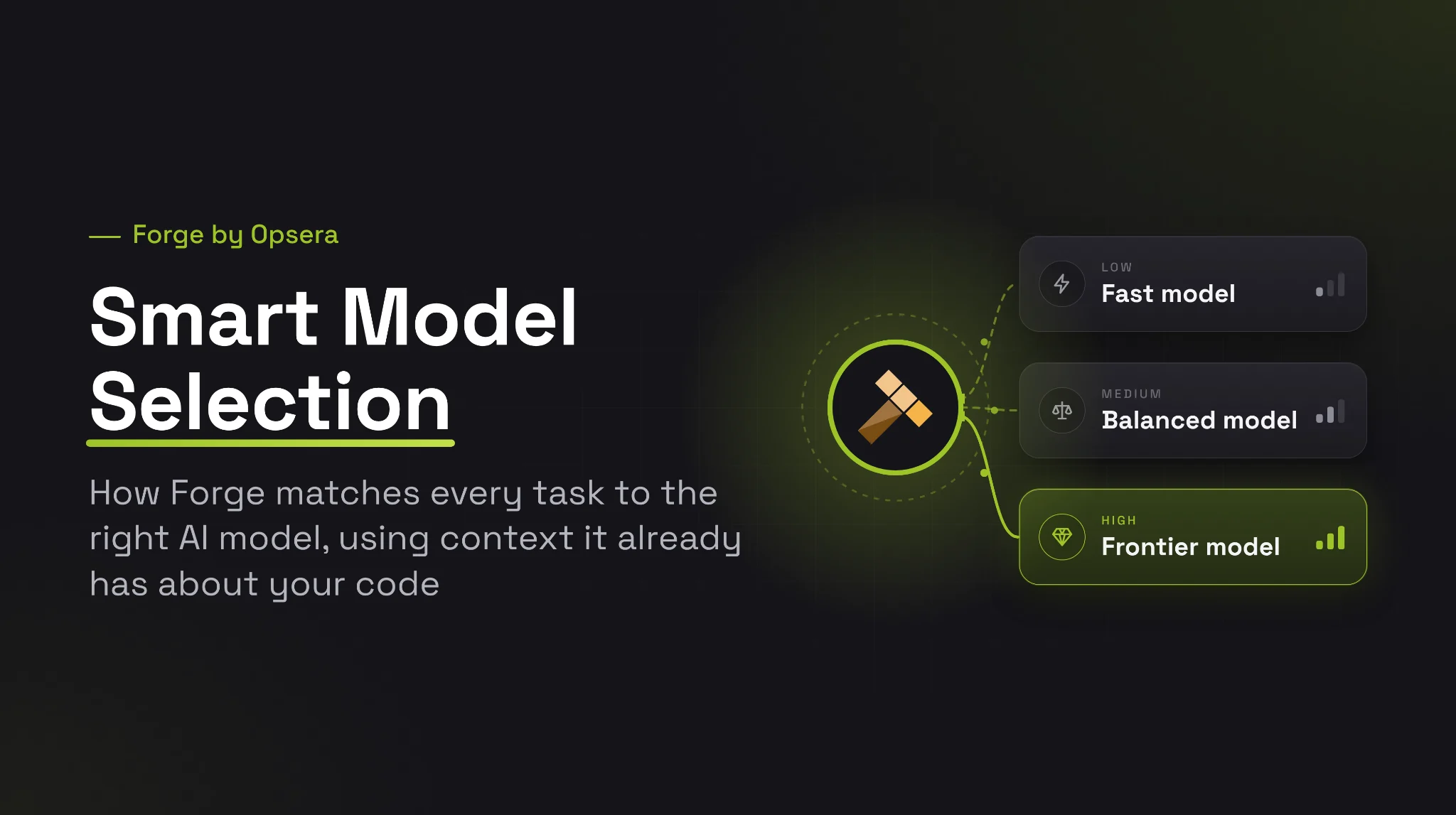
Smart model selection is matching each AI coding task to the model that fits it, instead of sending everything to one default. It weighs how much reasoning the task needs, how much context it must read, and how fast and accurate the result has to be, then picks the cheapest model that can do the job well.
The price gap makes this worth doing. Within one provider's lineup, the smallest model can cost a few percent of the flagship per token, and most work in a backlog is routine: config cleanups, test scaffolding, dependency bumps. Gartner's advice on AI coding costs says the same thing: route simple, high-frequency tasks to smaller models and keep frontier models for complex, high-value work.
How Big Is the Gap Between Models?
The spread is wide at every major provider. Here is the input price per million tokens for a flagship and a small model from each, as published in November 2026 by Anthropic, OpenAI and Google.
| Provider | Flagship model, input | Small model, input | Small as a share of flagship |
|---|---|---|---|
| Anthropic | Claude Opus 5.5, $4.00 | Claude Haiku 5.5, $0.10 | 2.5% |
| OpenAI | gpt-6-astra, $10.00 | gpt-6-luna, $0.10 | 1% |
| gemini-3.1-pro-preview, $2.00 | gemini-3-flash-preview, $0.50 | 25% |
A low-complexity story that runs on the small model instead of the flagship costs a fraction as much, as long as the small model can do the job. Sizing the task first is what tells you whether it can.
The hard part is knowing which task is which before the run. That takes context.
How Does Forge Size a Task Before It Runs?
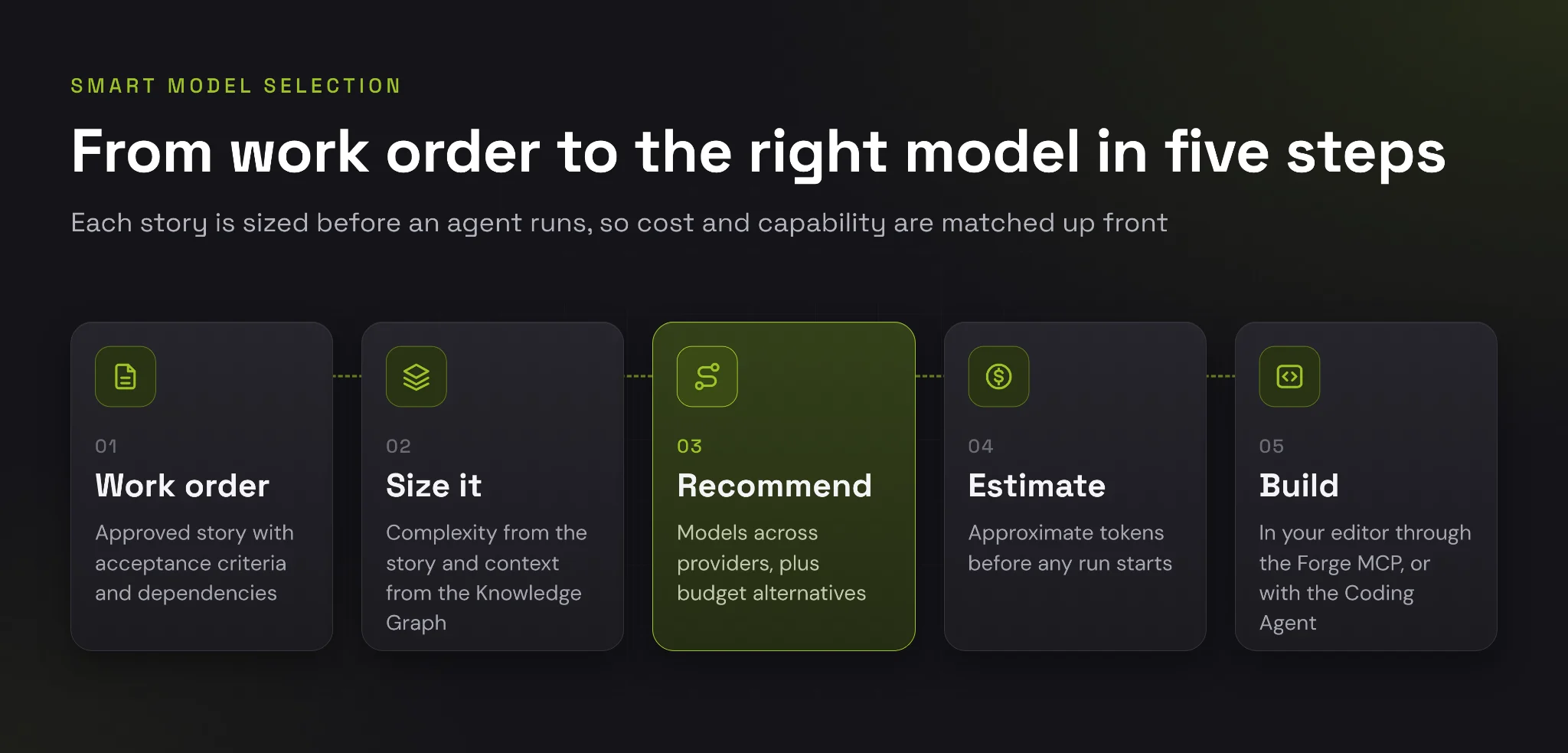
Forge sizes a task from what it already knows about the codebase and the work order, then turns that into a complexity level, a set of recommended models, and a token estimate.
Context From the Knowledge Graph
A model can only match a task if someone understands it. In Opsera's words, "Context is Forge's answer to that gap." Forge's Knowledge Graph ingests the codebase and maps its entities, dependencies, and relationships, and Context captures the legacy logic, architecture, organizational rules, and business intent behind the system.
That context is what lets Forge tell a one-file config change from a change that ripples through ten services. The work order already knows which repository it targets, which acceptance criteria it carries, and what it depends on.
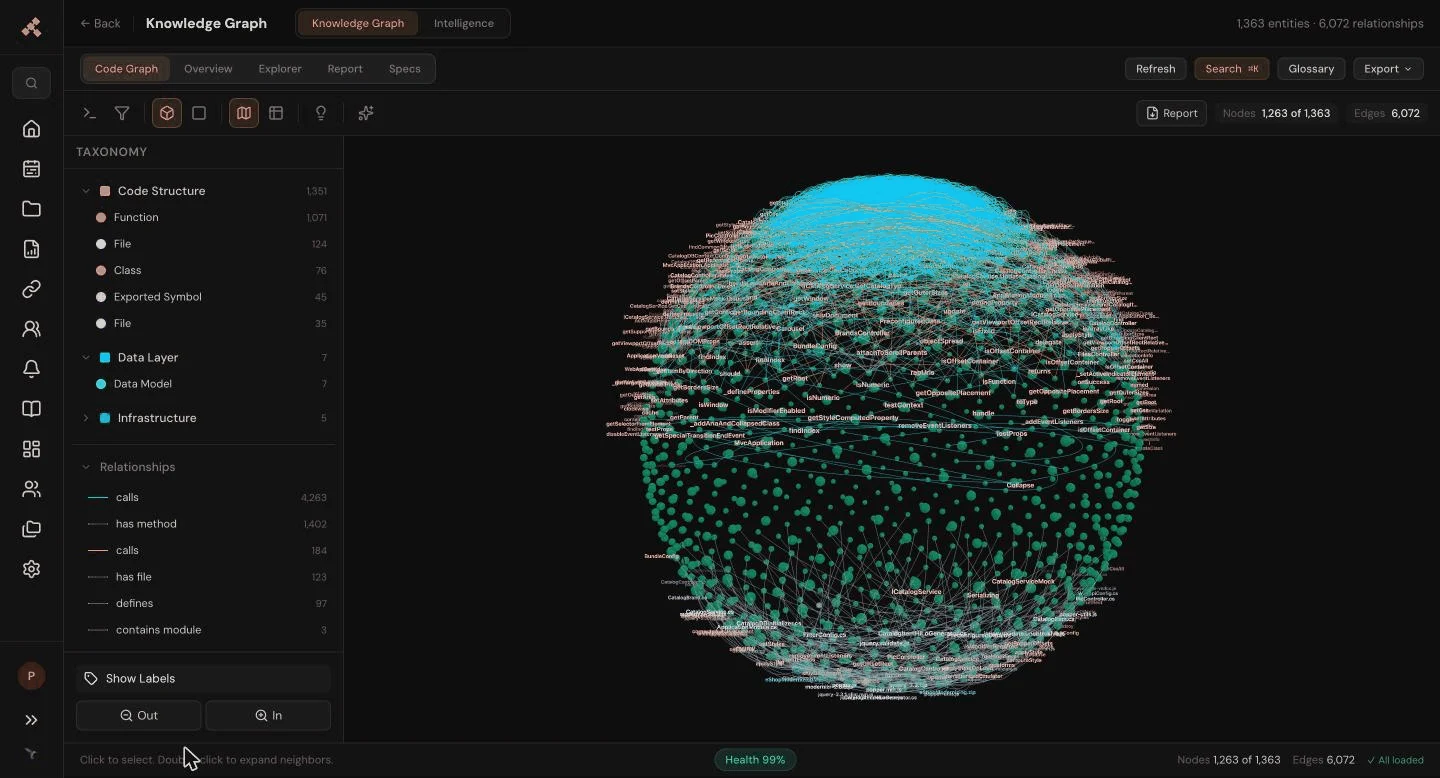
The Knowledge Graph for a sample application: 1,363 entities and 6,072 relationships that people and agents read from.
What a Sized Work Order Looks Like
Each work order carries three signals, all visible before anyone launches a run:
- Complexity: A level of low, medium, or high, shown as a label on the story.
- Suggested AI models: A recommended set across providers and budget alternatives, chosen for that complexity.
- Token estimate: An approximate token count for the run. According to Coding Agent docs, it comes from prior runs scaled by complexity (0.6x low, 1.0x medium, 1.5x high), or from a platform baseline when no history exists.
Take a real work order from a sample project: WO-002, "Sanitize example configuration secrets," labeled security, OWASP compliance, and low complexity. Forge recommends fast, low-cost models such as claude-haiku-4-5, gpt-5.4-mini, gemini-3.5-flash and SWE-1.6-fast, lists budget alternatives on AWS Bedrock, Qwen and Moonshot, and estimates about 17K tokens from platform defaults. Nobody spends a frontier model on a config cleanup.
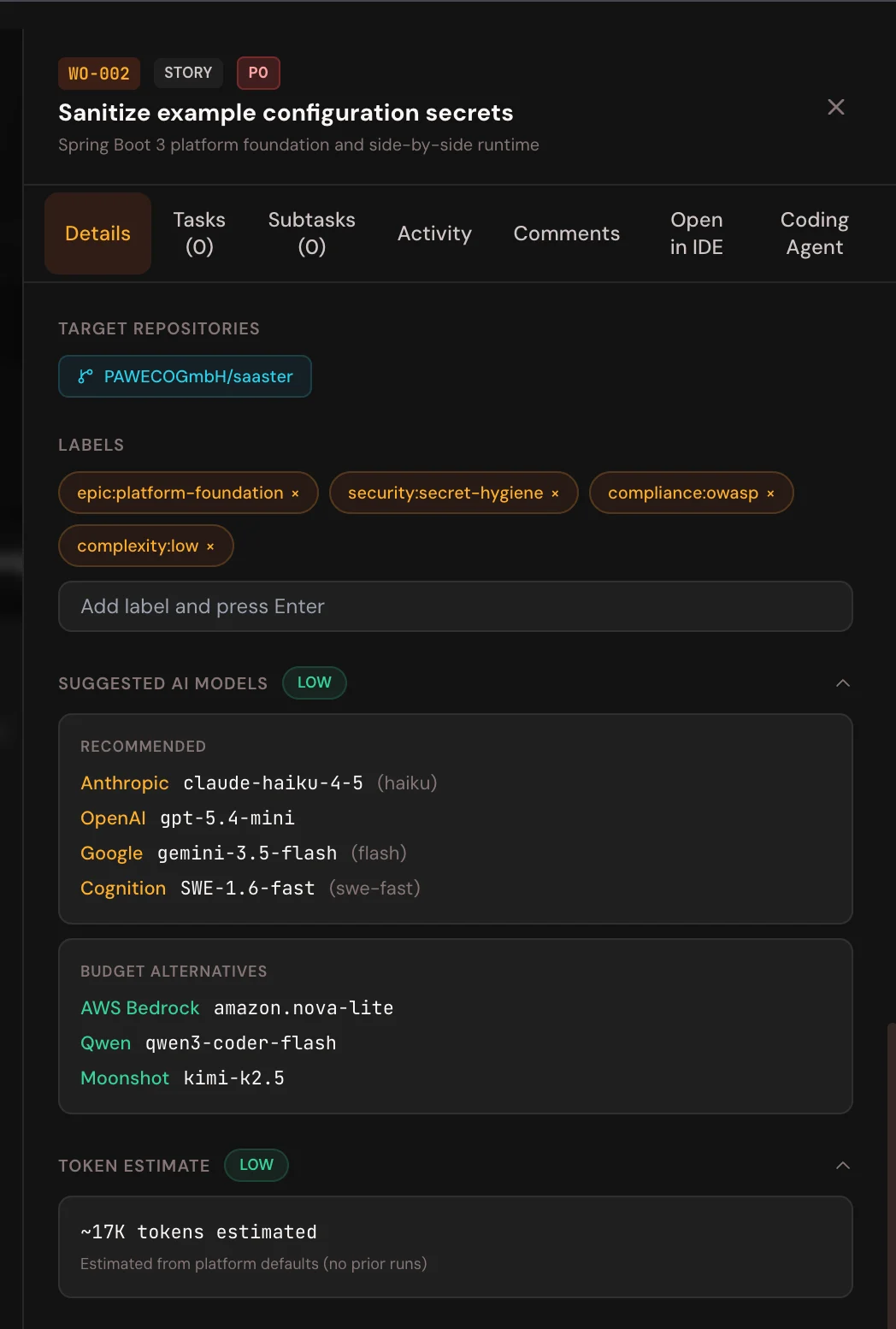
Work order WO-002 in Forge: low complexity, recommended models across four providers, budget alternatives, and a token estimate before any run.
Recommended Models and Budget Alternatives
The suggestions come in two lists, and both change with the story's complexity:
- Recommended: The models Forge expects to handle this level of work well, across providers. For WO-002 that meant small, fast models from Anthropic, OpenAI, Google and Cognition.
- Budget alternatives: Lower-cost options for the same level, including hosted and open-weight models. For WO-002 those were amazon.nova-lite on AWS Bedrock, qwen3-coder-flash and kimi-k2.5.
Move up one level and both lists change. WO-001 in the same project, "Create Spring Boot Maven foundation", is tagged medium complexity. Its recommended list widens to ten models, adding xAI's Grok, DeepSeek, Qwen and Moonshot alongside Anthropic, OpenAI, Google and Cognition. Its budget list swaps in amazon.nova-pro, deepseek-v3.2 and Mistral's devstral-2-123b. The token estimate grows from about 17K to about 28K. Both figures come from platform defaults because neither story has run yet, and the ratio between them matches the 0.6x and 1.0x scaling the docs describe for low and medium work.
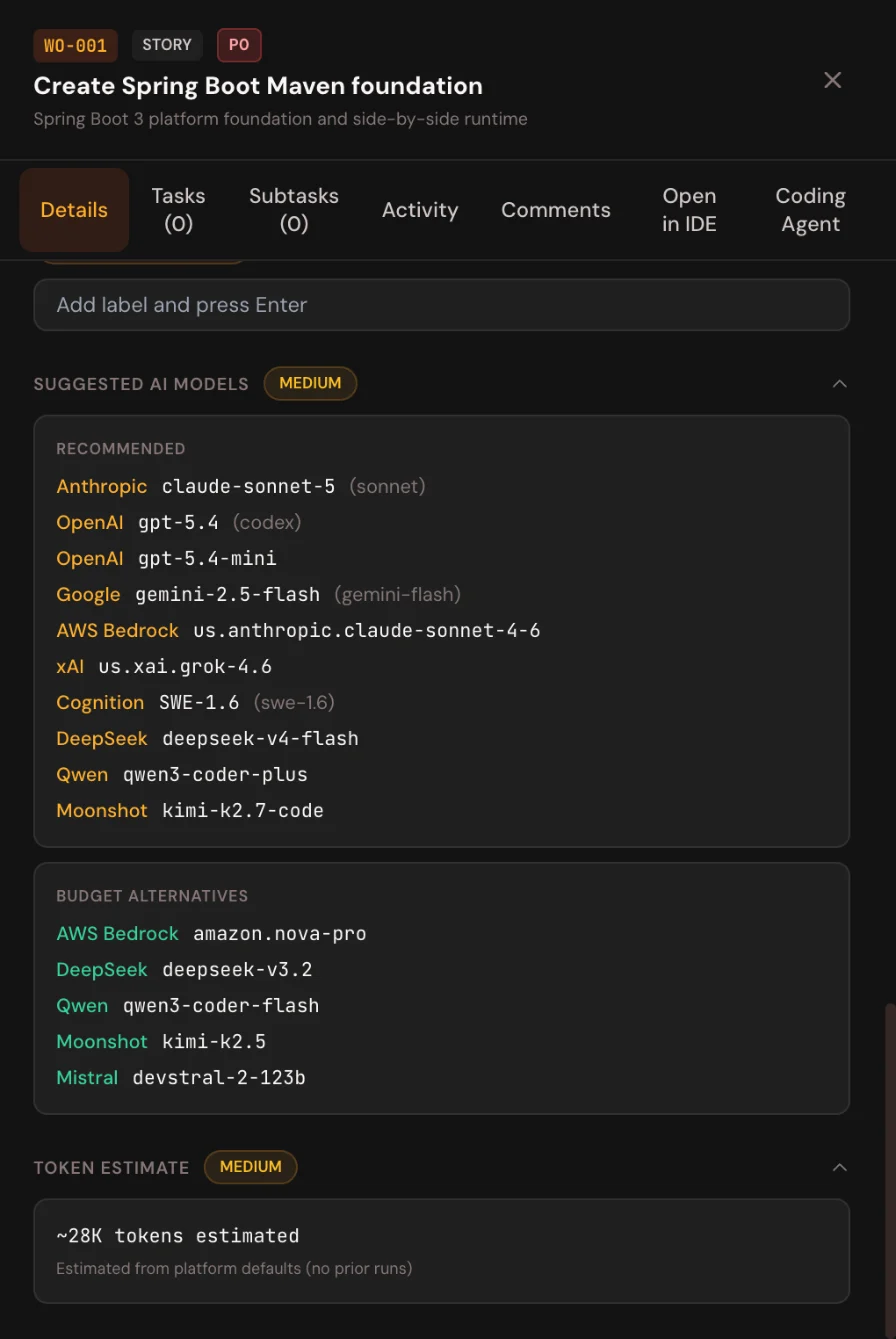
The same project, one level up: WO-001 at medium complexity, with a wider model list and an estimate of about 28K tokens.
A high-complexity story, such as a cross-service migration, moves further in the same direction, with a higher token estimate. The developer still makes the final call.
The Same Idea Inside Forge's Own Generation
Forge applies the same thinking to the artifacts it generates. When Deep Analysis is enabled for a tenant, each journey stage can run in Quick or In-Depth mode, and the default, Auto, picks between them based on codebase size and ingest volume.
| Mode | Best for | What happens |
|---|---|---|
| Quick | Smaller scope, greenfield briefs, document-only projects | One pass from pre-assembled context |
| In-Depth | Large repositories and modernization | Agentic, multi-round generation that explores the code with tools |
| Auto (default) | Most projects | Forge chooses Quick or In-Depth for each run |
Small jobs get a single pass. Large legacy codebases get the deeper, more expensive treatment only when they need it.
How Does Smart Model Selection Work With the Forge MCP?
The recommendation is most useful in the editor, at the moment a developer picks up a task. The built-in Forge MCP server carries it there, along with the work order and its specs.
From Work Order to the Right Model, Step by Step
The five steps below run the same way in every supported editor.
- Connect the editor On a project's Connect IDE tab, Quick Setup installs the Forge MCP server in one click for Cursor, VS Code, and Windsurf, and gives Claude Code and Devin a command or config snippet, as per the MCP integration docs. Antigravity is supported too.
- Set the project The session is tied to one Forge project, and linked repositories come back when it is set.
- Start a work order When the developer gets or starts a coding-eligible work order, the response includes
recommended_models, the same suggestions shown on the story's Details tab. - Load the specs The assistant reads the intent, requirements, architecture, and traceability matrix it needs for that story.
- Build and report back The developer implements and tests on the suggested model, prepares a commit tagged with the work order, updates it, syncs activity, and opens a pull request.
What the Connection Looks Like
In Forge's settings, the Connect IDE section shows the MCP server URL, https://forge.opsera.ai/api/mcp, with a Test Connection button to check the link. Below it, each editor has its own manual setup card.
For Cursor, that means opening ~/.cursor/mcp.json, pasting the generated configuration, and reloading the MCP servers. Claude Code gets a single claude mcp add command instead.
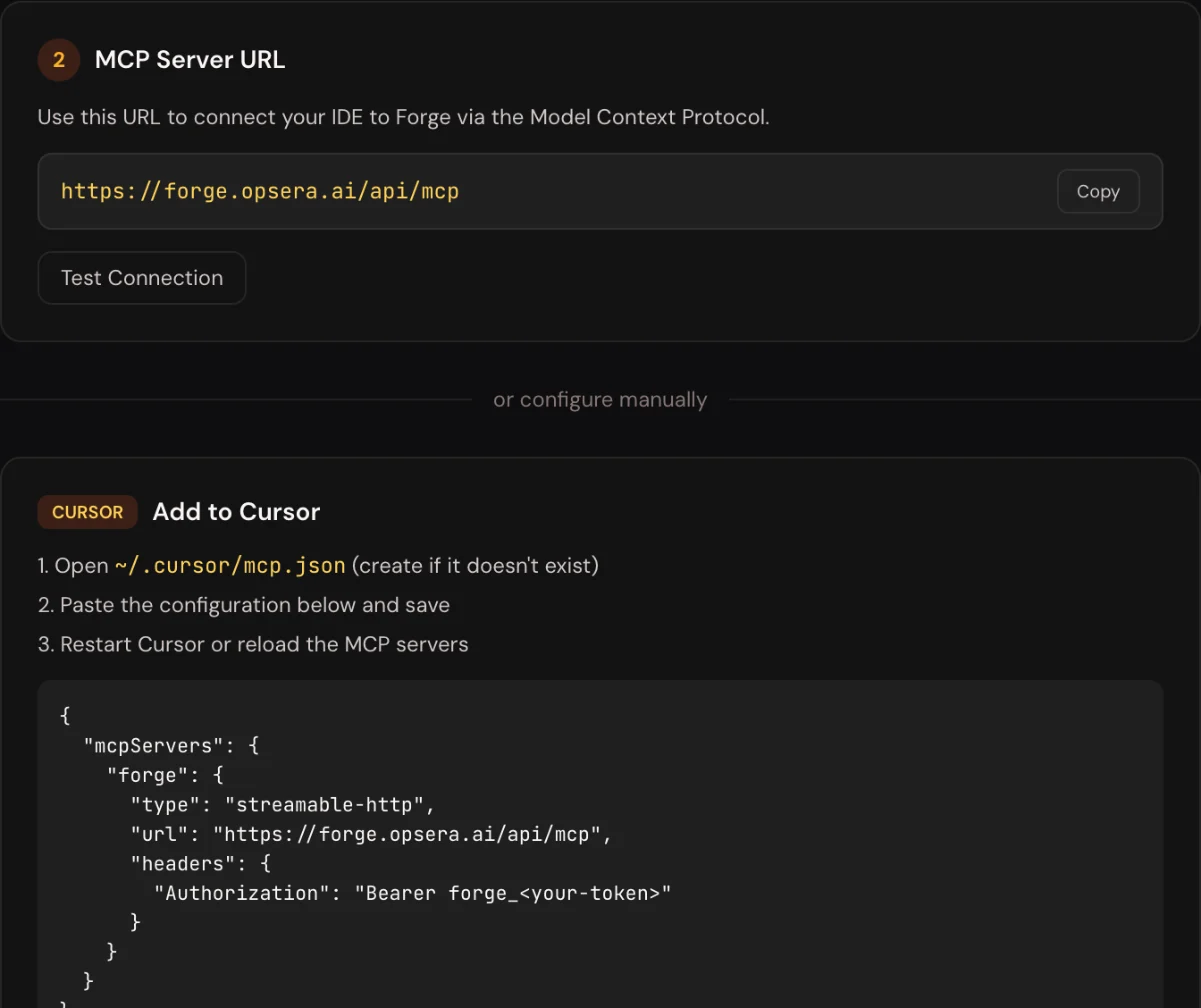
Forge's Connect IDE settings: one MCP URL, a connection test, and a ready-made config for Cursor, with the token left as a placeholder.
Each developer creates their own token under Profile, API Tokens. It follows that person's project access, is shown once, and can be revoked.
Developers can also start from the story itself. Each work order has an Open in IDE tab with launchers for Cursor, Windsurf, Devin Desktop and Claude. Underneath sits a Prompt Preview that the developer can copy. It opens with the Forge MCP setup steps, so the assistant can pull the work order, its specs and its recommended models before writing any code.
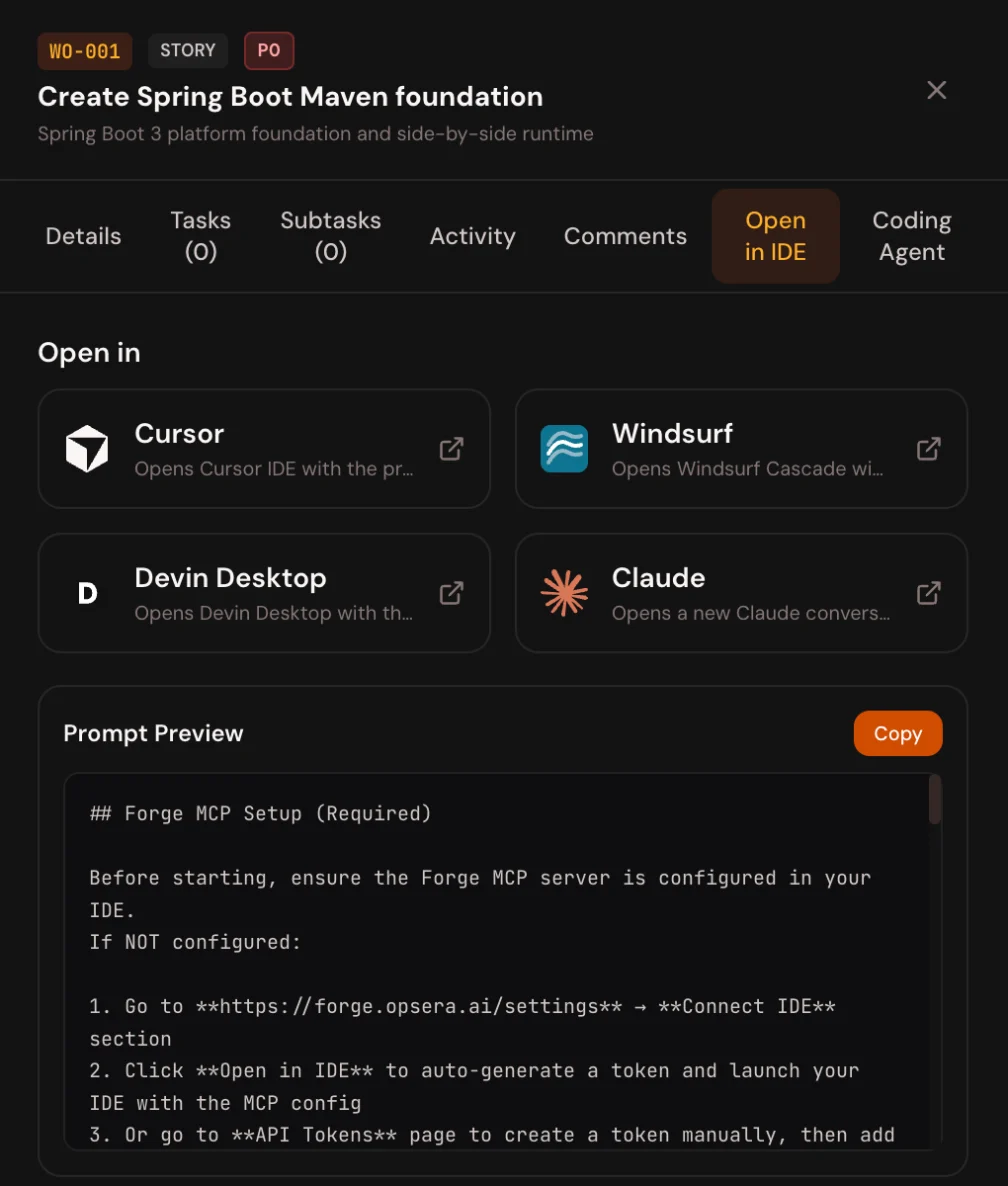
Open in IDE on WO-001: pick an editor, or copy the prompt, which starts by checking that the Forge MCP server is connected.
In Cursor, Two Commands Do Most of It
The Forge Cursor Plugin adds slash commands on top of the same connection. /work shows the next work order with its acceptance criteria and priority. /start-work runs the full path, from fetching the work order and loading the artifacts to committing, opening the pull request, and completing the work order after merge.
How Do Teams Use Smart Model Selection?
Teams use the recommendation where the work happens: in the developer's editor, and in the plan for a batch of agent runs.
- In the editor. The recommendation arrives with the work order through the Forge MCP, before the developer writes the first prompt.
- On a budget. Budget alternatives give a cheaper option for each complexity level, useful when a team runs many small stories or wants to keep spend on open or hosted models.
- Before a batch. The Implement All panel shows a token estimate for the selected stories, so a tech lead sees the likely cost of a batch of Coding Agent runs before launching it. Forge-managed Coding Agent runs use platform default models rather than the per-story picker.
- Over time. As stories run, estimates draw on real history instead of platform defaults, so they get closer to actual usage.
Which Model Tier Fits Which Task?
| Complexity | Typical work | Model tier |
|---|---|---|
| Low | Config cleanups, renames, test scaffolding | Fast, low-cost models |
| Medium | Feature work inside one service | Balanced models |
| High | Cross-service changes, migrations, security-critical logic | Frontier reasoning models |
The exact models change as providers release new ones. The principle does not: spend reasoning where the task needs it, and nowhere else.
Where Do the Models Run, and Who Pays?
Forge runs its own generation on a platform default key, and a tenant can switch that to its own provider account as per the OpenAI and Google Gemini connector docs:
- Providers. AI Provider connectors cover Anthropic, OpenAI, Google Gemini, Amazon Bedrock, Qwen, Moonshot, and custom LLMs.
- Bring your own key. Once a tenant admin connects a key, Forge routes generation calls through it instead of the platform's default Anthropic-based key.
- Scope. The chosen provider applies across supported workflows, including code review, the Coding Agent, Knowledge Graph enrichment, and Council review.
- Billing. Those calls are billed to the tenant's own provider account.
The budget alternatives on a work order line up with these connectors, so a team that already runs models on AWS Bedrock or Qwen can keep low-complexity work there.
How Do You Know Smart Model Selection Is Working?
Compare what Forge estimated with what runs actually used, and watch the trend per project.
| Where | What it shows |
|---|---|
| Story Details tab, launcher and Implement All panel | The token estimate before a run |
| Application Context, Insights, Coding Agent | Total runs, success rate, average duration, and the remaining estimate for stories not yet run |
| Insights and run results, for Platform Admins | Realized token counts and cost |
If low-complexity stories keep passing on budget models, move more work there. If they fail and get re-run, the retries can cost more than the stronger model would have, and the recommendation should move up a tier.
Conclusion: Spend Reasoning Where the Task Needs It
The one-model habit this guide opened with persists because nobody sees the cost of each task until the invoice arrives. Forge puts that cost on the story. In the sample project, a config cleanup came in at low complexity with small, fast models and an estimate of about 17K tokens, while a Spring Boot foundation story came in at medium with a wider model list and about 28K. Same backlog, two different answers, both visible before anyone pressed run.
That is what smart model selection changes. The choice moves from a team-wide default to each work order, based on what the Knowledge Graph already knows about the code rather than a guess. Developers still make the final call, but they make it with the complexity, the options, and the likely cost in front of them.
Start by checking last month's AI usage: how much of it ran on your most expensive model for work a smaller one could have done? Then see how Forge by Opsera sizes your own backlog, and read How Forge Gives AI Agents a Living Ontology for the context layer that makes the sizing possible.
Questions.
What is smart model selection in AI coding?
Smart model selection matches each AI coding task to the right model, based on how much reasoning, context, speed, and accuracy the task needs. Routine work goes to fast, low-cost models and hard work to frontier models, instead of one default model handling everything.
How does Forge decide which AI model fits a task?
Forge sizes each work order as low, medium, or high complexity, using context from its Knowledge Graph and the work order's own requirements. It then shows recommended models across providers, budget alternatives, and a token estimate on the story before any run starts.
Does smart model selection reduce AI token cost?
It can, because the price gap between models is large. On Anthropic's price list, Claude Haiku 5.5 input costs a fortieth of Claude Opus 5.5 input. Routing routine tasks to smaller models, as Gartner recommends, cuts spend without slowing the work that needs a frontier model.
Which AI models can Forge work with?
Forge's AI Provider connectors cover Anthropic, OpenAI, Google Gemini, Amazon Bedrock, Qwen, Moonshot and custom LLMs. A tenant can bring its own key, so generation runs and bills through its own account. Model suggestions on a work order span several of these providers, plus budget alternatives.
Does the Forge Coding Agent use the suggested models?
No. Per the Forge docs, the suggested models are for developers working in their editor through the Forge MCP. Forge-managed Coding Agent runs use platform default models, and the launcher still shows a token estimate before each run, so cost is visible either way.