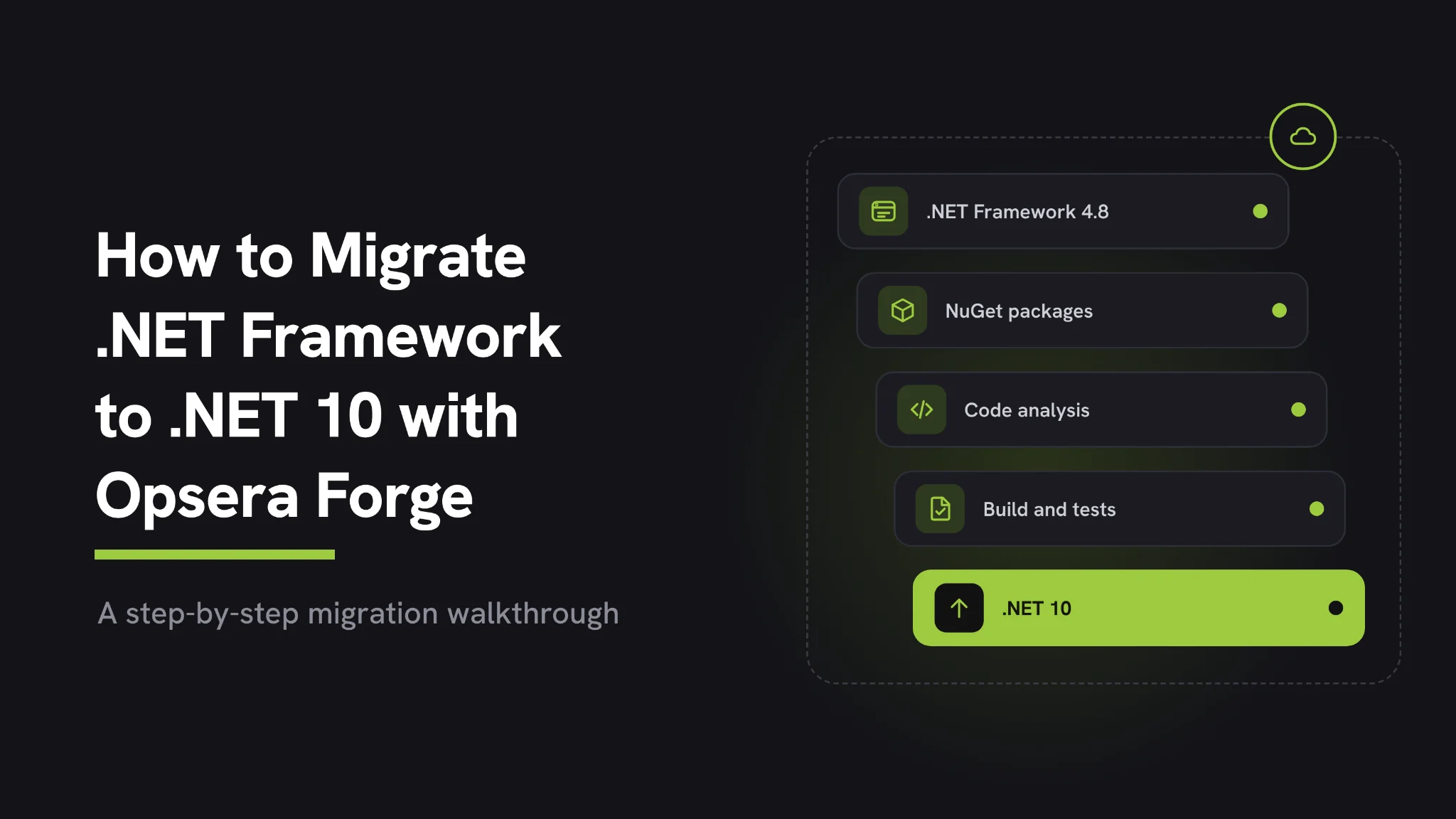
How to Migrate .NET Framework to .NET 10 with Opsera Forge
Key Takeaways
- Forge's modernization score, ForgeScore, rated the legacy app 56 out of 100 before any code changed and pointed at the exact files behind each risk
- The team's list of everyday staff tasks became the acceptance tests for the new app
- Forge split the migration into 46 small tasks called Work Orders, each with its own files, tests and definition of done, with the safety net scheduled before the risky changes
- Decisions only the team could make, such as how staff sign in and where passwords and keys live, were answered once and reused in every later step
- The old app keeps running until the new one proves itself, with a way back at each stage.
Suppose we have a retail company that runs its product catalog on an internal app built years ago on .NET Framework, the older, Windows-only version of Microsoft's .NET. The app still works, but it only runs on Windows servers, the company now wants everything in Linux containers, and none of the developers who wrote it still work there.
This walkthrough follows the company's team as they move that app to .NET 10 with Opsera Forge. Forge, the orchestration layer that sits above AI coding tools, reads the existing code, writes down what the app does and turns the migration into small, checked tasks that developers or AI coding tools work through one at a time. Every step uses a real open-source app, so you can repeat it on your own code.
Here is the whole path at a glance, from the first ForgeScore to the day staff switch over.
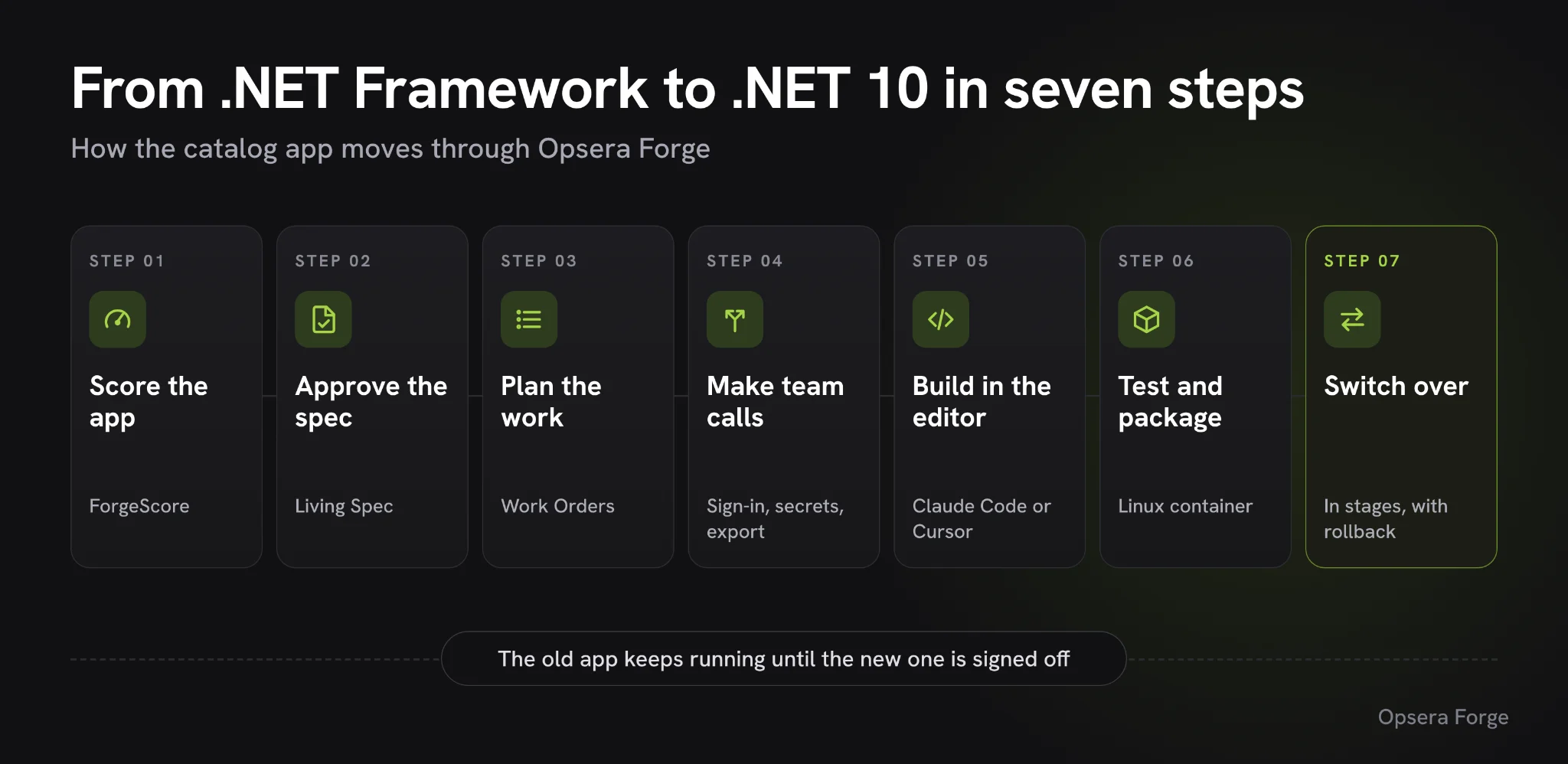
The legacy catalog app and its .NET Framework stack
The app in this story is an internal tool that staff use every day to add, edit, price, and remove the products the shop sells. We use Microsoft's own eShopLegacyMVC sample, because it looks exactly like the line-of-business apps many companies still run.
Here is what the team is working with:
- ASP.NET MVC 5 and Web API 2 on .NET Framework 4.7.2, running on IIS, the Windows web server
- A SQL Server database reached through Entity Framework 6, Microsoft's older data library, plus older add-on libraries such as Autofac and log4net
- Startup and settings spread across
Global.asax, theApp_Startfolder, andWeb.config, files that modern .NET no longer uses - No automated tests, so the only record of how the app should behave is what staff do with it.
The pressure comes from three directions at once. The Windows Server licenses are up for renewal, the cloud team has standardized on Linux containers, and nobody left on the team wrote the original code.
The goal the team sets is simple to say and hard to do. Staff should keep doing every task they do today, on a supported .NET release, running in a Linux container.
Before touching any code, it helps to see where each old piece ends up. This is the map the team works towards, with the Work Order that handles each move.
| What the app uses today | What it becomes on .NET 10 | Work Order |
|---|---|---|
| Classic project files on .NET Framework 4.7.2 | SDK-style projects targeting net10.0 | WO-001 |
Global.asax and the App_Start folder | A single Program.cs startup file in ASP.NET Core | WO-004 |
RouteConfig and WebApiConfig | ASP.NET Core endpoint routing | WO-010 |
Web.config settings | appsettings.json, with secrets in Azure Key Vault | WO-008, WO-024 |
| Autofac | The dependency injection built into .NET | WO-009 |
| Entity Framework 6 | EF Core | WO-018 |
BinaryFormatter brand export | A JSON export using System.Text.Json | WO-006, WO-032 |
BundleConfig script bundles | ASP.NET Core static web assets | WO-011 |
| IIS on Windows Server | A Linux container | WO-030 |
Why a manual rewrite or an AI coding tool alone felt too risky
Before picking a tool, the team looked at the usual ways to reach that goal, and each one fell short in a way that would hurt later.
- A manual rewrite means months of work, and the rules the app follows were never written down anywhere
- An AI coding assistant on its own writes code quickly, but it starts every session with no memory of the app and no guardrails on what it changes
- Moving the app into Windows containers keeps it on Windows, keeps the license bill, and leaves it on
System.Web, the old part of ASP.NET that modern .NET has dropped
What the team wanted was a map of the app before anyone touched it, a plan small enough to review step by step, and proof at the end that nothing staff relies on had changed. That is the job Opsera Forge is built for.
Setting up the repo, Forge and the test checklist
With Forge chosen, the team gets a few things ready so the rest of the walkthrough runs without stopping.
- A clean copy of the code: the team works from a fork of Microsoft's repo that holds only the legacy MVC app. Microsoft's repo also contains finished, already-ported versions of the same app, and those were removed, so Forge starts from the legacy code alone.
- A Forge project: a workspace in Forge with the repo imported.
- An AI coding editor: such as Claude Code or Cursor, connected to Forge through MCP, the standard way AI tools plug into outside services. This puts Forge's plan right inside the editor.
- Docker on a developer machine, to run the migrated app in a Linux container.
- A list of 14 everyday staff tasks, kept in
checks/staff_tasks.md. It covers browsing and paging the catalog, opening an item, adding, editing, and deleting items, the brand API, the brand file download, and the session details in the footer.
That last list does more work than it looks like, because Forge later turns it straight into the acceptance tests for the new app. With the setup done, the team is ready to let Forge look at the code.
Scoring the legacy app with ForgeScore
With everything ready, the team's first move is to import the repo into Forge and let it read the whole codebase. Forge maps how the app is built and then gives it a ForgeScore, a modernization score out of 100 that rates the code across eight areas, from how well it is protected to how ready it is to change.
The catalog app came back at 56 out of 100, rated Developing. That is a fair score for an app that works but was never built to move.
Forge read all 124 of the 124 files in the repo and found 27 technologies in use. The full dashboard adds the security picture: two known vulnerabilities (CVEs) in third-party packages, 16 packages past their end of life, and no passwords or keys left in the code.
Against outside standards, the app rated D on Forge's NIST secure development check and C on its CISQ code quality check. Forge set 70 as the target score for the migrated app.
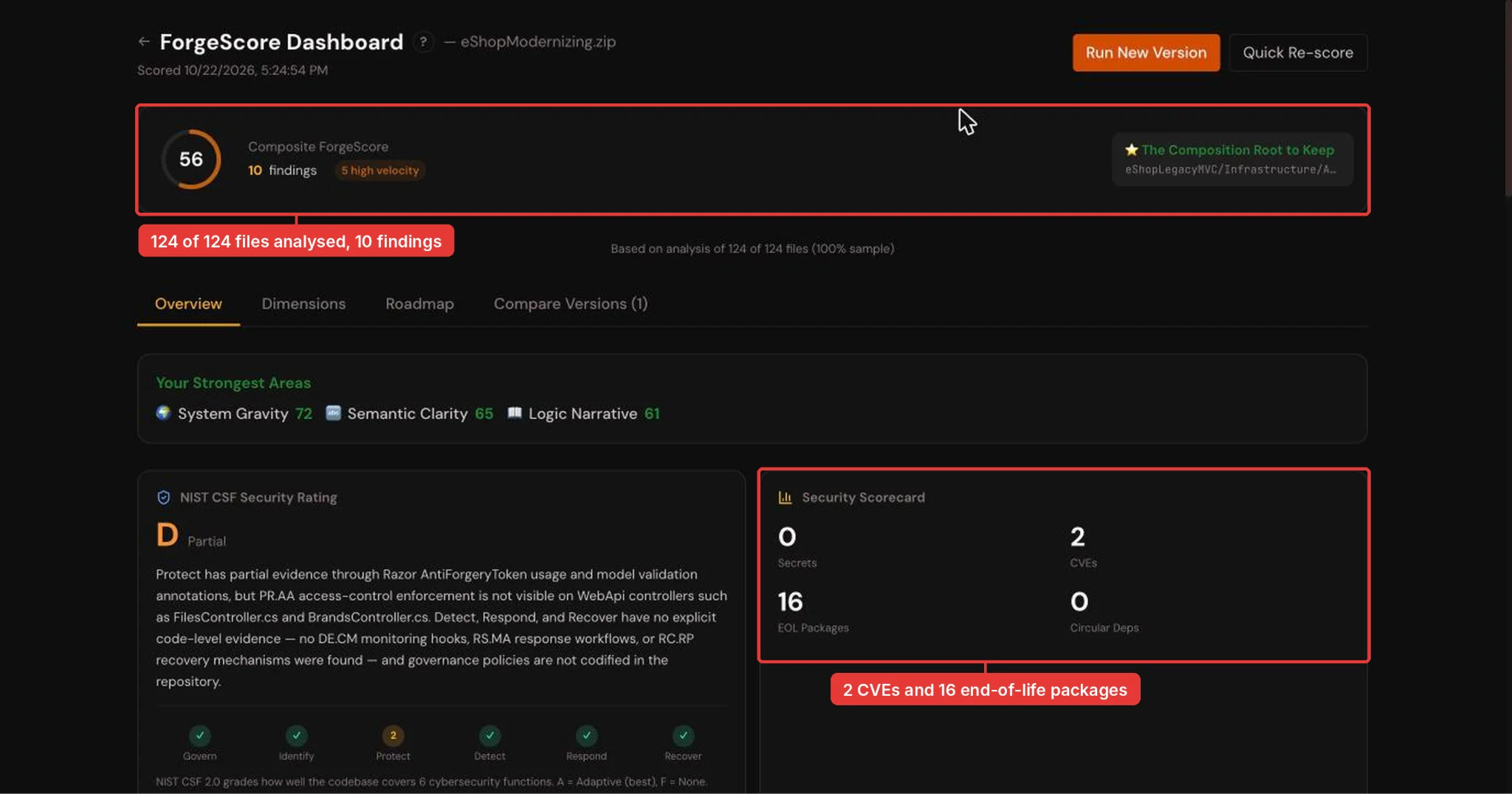
The full ForgeScore dashboard: 124 of 124 files analyzed, 2 CVEs and 16 end-of-life packages. In Forge: open the project, click ForgeScore in the left panel, then Full Dashboard.
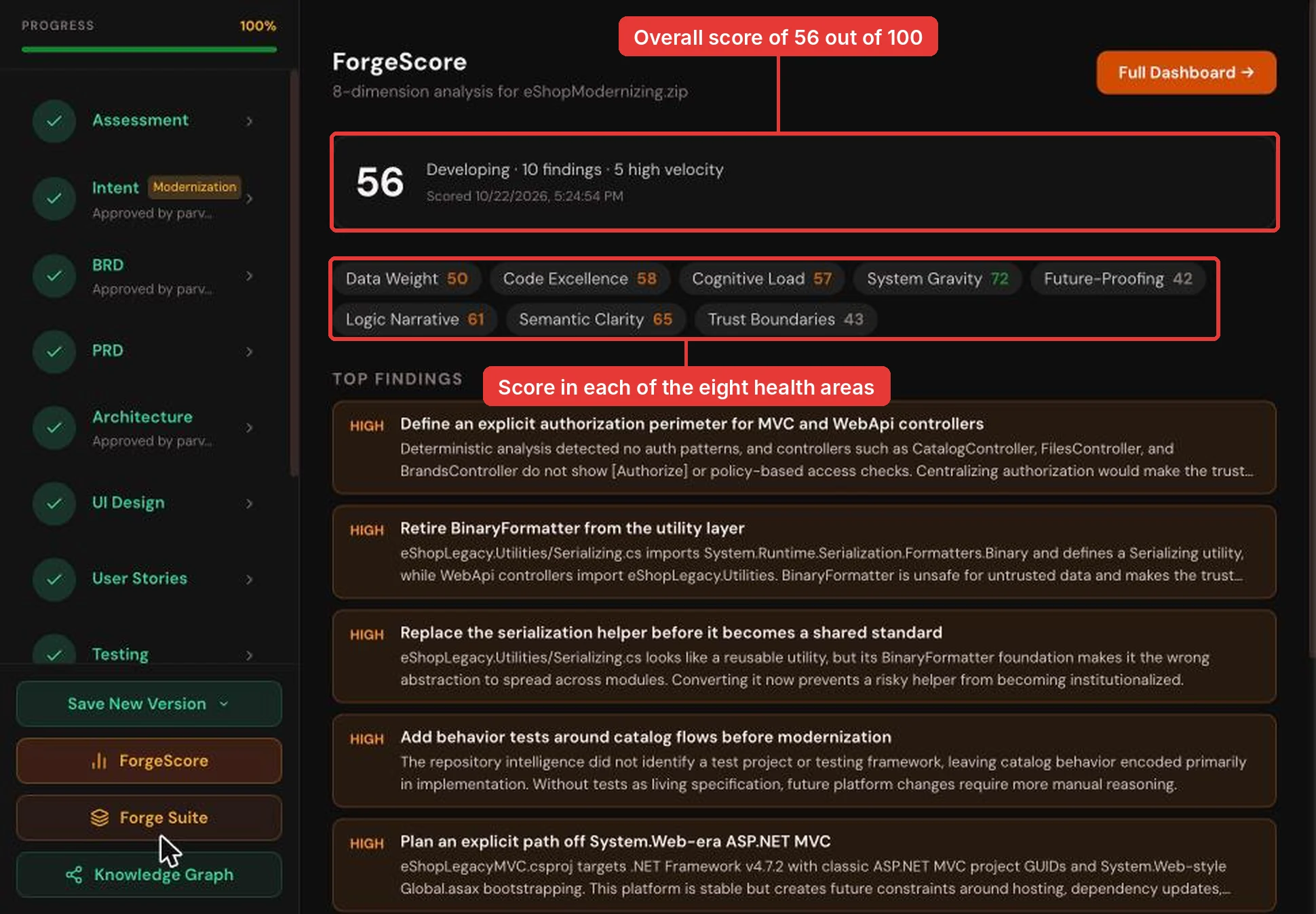
The catalog app scored 56 out of 100 across eight areas. In Forge, open the project and click ForgeScore in the left panel.
| Dimension | Score | What it tells a leader |
|---|---|---|
| System Gravity | 72 | How much else has to move when one part changes. The app is fairly well contained, with no circular dependencies |
| Semantic Clarity | 65 | How clearly the code says what it does. Catalog names read well across the app |
| Logic Narrative | 61 | How easy it is to trace a business rule back to the code |
| Code Excellence | 58 | Good patterns worth keeping, such as the way the app already keeps catalog logic separate from its web pages |
| Cognitive Load | 57 | How much effort it takes a person or an AI to understand the code |
| Data Weight | 50 | How ready the data layer is to change |
| Trust Boundaries | 43 | How well access, interfaces and file reads are protected |
| Future Proofing | 42 | How ready the platform is for what comes next |
The two lowest scores set the agenda. Forge's top findings each point at a specific file, which makes them easy to hand to the team.
- No sign-in checks on the app's entry points:
CatalogController,BrandsController, andFilesControlleraccept any request, because nothing in the code checks who the user is. - An unsafe file format: the brand file download uses
BinaryFormatter, an old .NET tool for packing data into files that modern .NET has removed and security teams treat as a risk. - No tests: nothing proves how the app behaves today, so there is nothing to check the new version against.
- Tied to
System.Web: the project, startup, and page routing all depend on the old ASP.NET framework, which modern .NET does not include. - Unchecked image file names: the file name saved with a product goes straight into the code that reads images from disk, so a crafted name could reach other files.
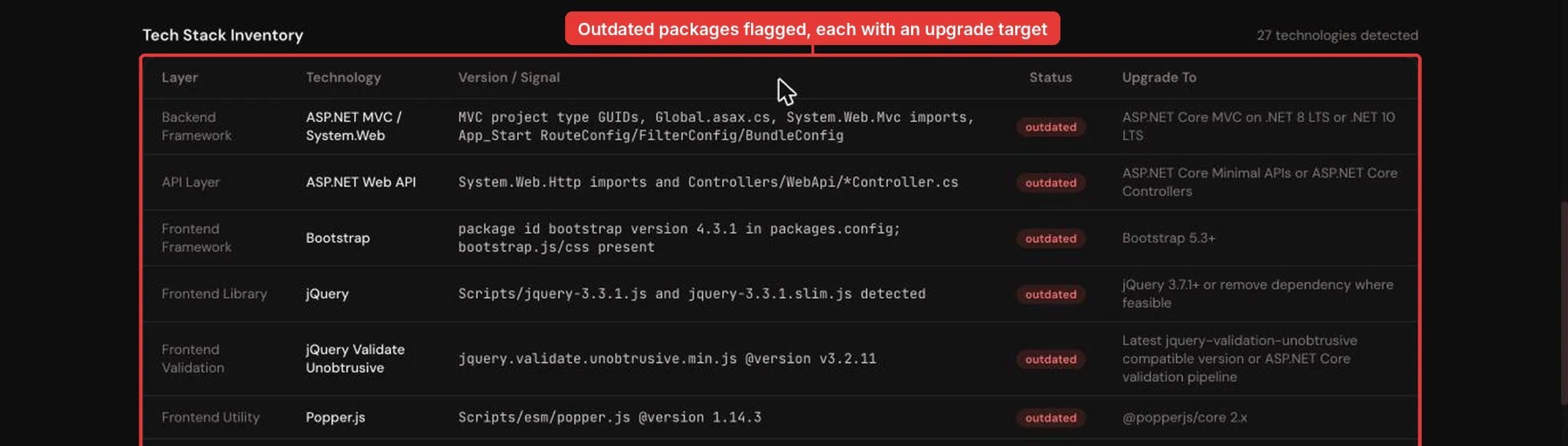
Each outdated package is listed with the version to move to. In Forge: ForgeScore > Full Dashboard, scroll to the tech stack section.
Forge also listed what is worth keeping, such as the protection against forged form submissions already on the edit pages and the clear naming across the catalog code. That list tells the team which parts to carry over rather than rewrite.
With the risks and strengths mapped, the next question is what the new app must keep doing.
Writing the Living Spec: what the new app must keep doing
To answer that, Forge writes down what the app does today and what the migration has to achieve. Forge calls this the Living Spec: a set of documents covering the goal, the business and product requirements, and the target architecture.
The spec is versioned and linked back to the code, so it stays accurate as the work moves on. The next migration can start from it instead of from scratch.
The first document, the intent profile, sums up the goal in one line: move the staff catalog app onto a secure, supported, testable .NET platform while keeping every catalog workflow intact. Under that, Forge set out six core features in priority order.
- An authorization perimeter around the catalog, brand and file controllers
- A safe replacement for the
BinaryFormatterbrand export - Safe handling of product image file names and paths
- A migration path from
System.Webto ASP.NET Core on .NET 10 - Automated regression tests for the catalog
- A clean-up of the old JavaScript and CSS packages
The part a leader should notice is how Forge used the staff task list. Each task became an acceptance criterion, a check the new app must pass before the work counts as done. For example:
- The catalog list shows 12 items, with 10 on the first page
- Asking for 5 items per page gives 5 items and 3 pages
- The ".NET Bot Black Hoodie" details show brand .NET, type T-Shirt, price 19.50 and stock 100
- A price of 12.345 is rejected with the two-decimals message
GET /api/brandsreturns the 5 brands
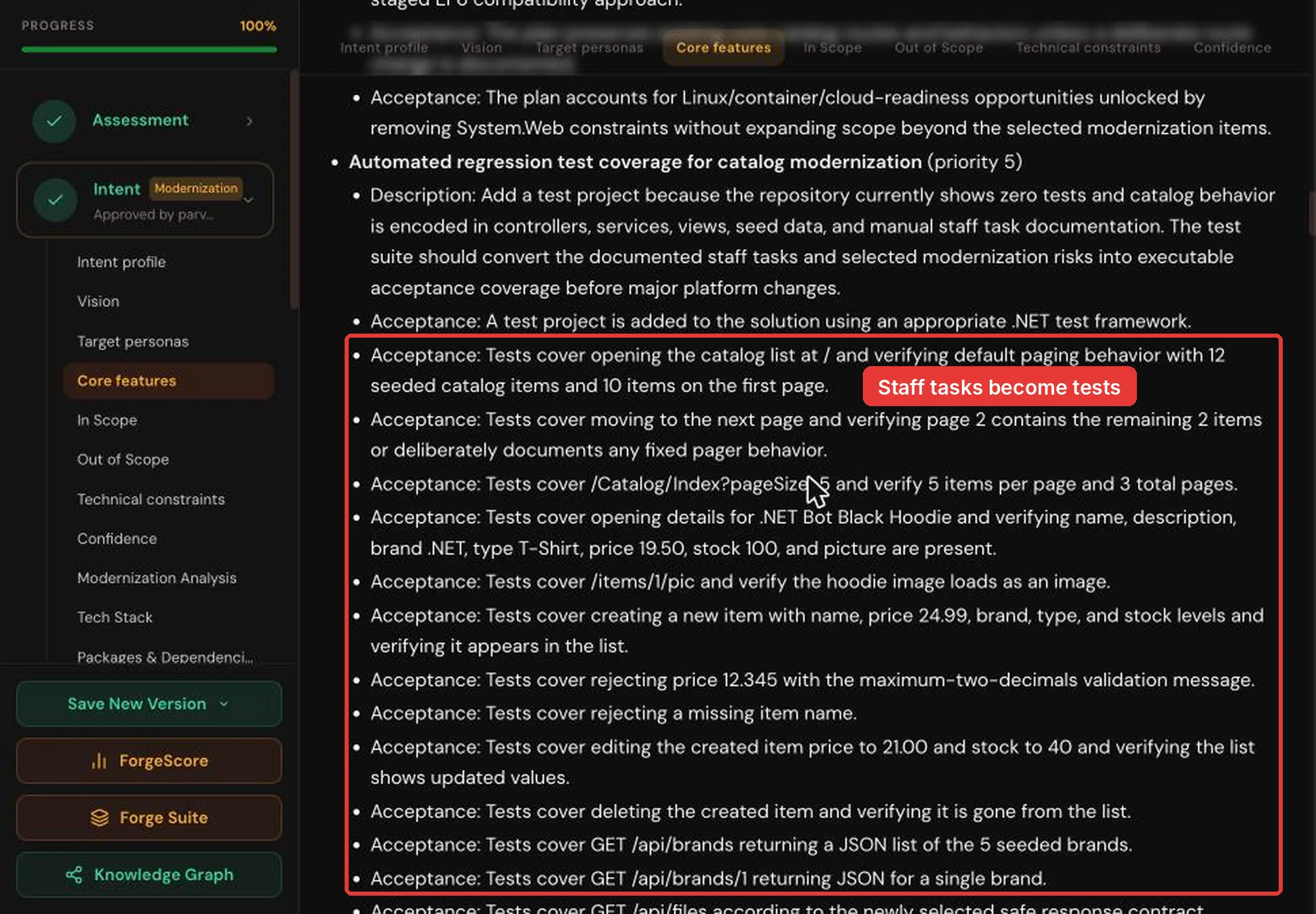
Staff tasks from the checklist are now acceptance criteria the new app must pass. In Forge: Living Spec > Intent > Core features.
Forge was also clear about what is out of scope, which keeps the project from growing. There is no checkout, cart, or storefront work, no redesign of the catalog data, and no database engine change unless the platform move needs one.
Where the code could not answer a question, Forge asked. The team answered once, and those answers now shape every later step.
- Sign-in: staff sign in with their Microsoft work accounts through Microsoft Entra ID, with an extra verification step for admin actions
- Passwords and keys: these move into Azure Key Vault, a secure store for secrets
- Images: product pictures move to cloud file storage
- Resilience: the app runs across several data centers in one region, with a backup region ready to take over
- Releases: builds and deployments run through Forge Shipping, Forge's own release pipeline
Forge rated its own confidence in this plan at 88%, and listed what would raise it, such as naming the exact staff roles. The team reviewed each document and approved the assessment, intent, business requirements, architecture, and UI design, which unlocked the next stage of turning the spec into work.
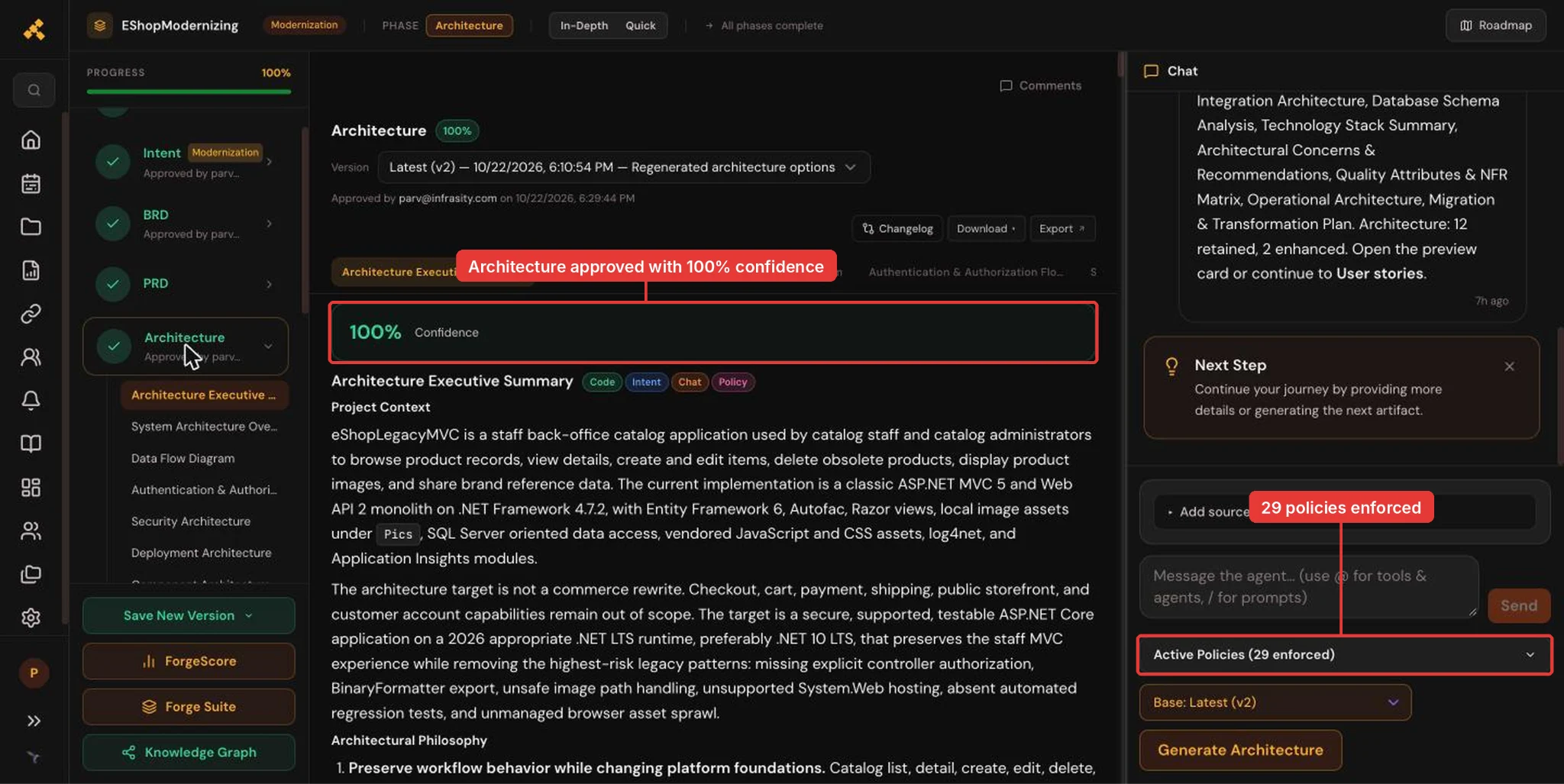
The approved target architecture, with 29 policies Forge checks every change against. In Forge: Living Spec > Architecture.
Breaking the migration into 46 Work Orders
The approved spec now becomes the work plan. Forge breaks the migration into Work Orders: small, self-contained tasks, each with the files to change, the tests to pass, and a clear definition of done.
For this app, Forge produced 46 Work Orders worth 188 story points, a rough measure of effort, grouped into eight areas.
| Area | Work Orders | Story points |
|---|---|---|
| ASP.NET Core .NET 10 platform foundation | 6 | 32 |
| EF Core data and seed migration | 5 | 28 |
| Staff authorization and audit | 6 | 24 |
| Frontend asset clean-up | 6 | 23 |
| Deployment, rollout and operability | 6 | 22 |
| Product image name and path safety | 6 | 21 |
| Automated regression safety net | 6 | 20 |
| Safe brand export contract | 5 | 18 |
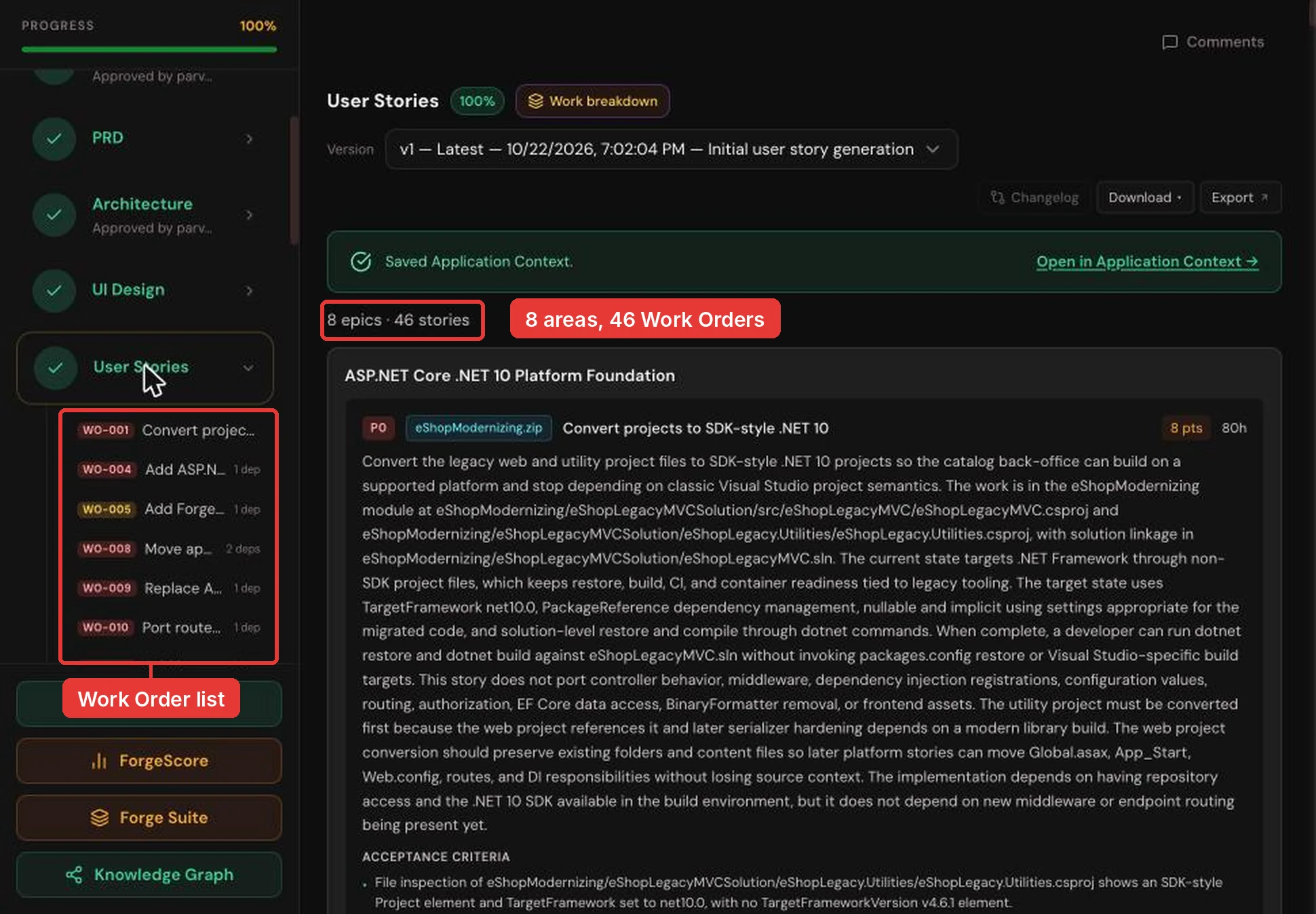
The 46 Work Orders, grouped into eight areas. In Forge: open the User Stories tab, where Forge lists the Work Orders.
Each Work Order is small enough to review in one sitting, and it carries everything a developer or an AI agent needs. Take WO-006, which retires the unsafe serializer:
- Goal: remove
BinaryFormatterfromSerializing.csso the app no longer carries an unsafe object serializer - Files:
Serializing.csand its project file, and nothing else - Done means: a search for
BinaryFormatterreturns no matches, any remaining method refuses to run, unit tests prove it, and the solution still builds - Testing: a source scan, a build, and unit tests, with the HTTP side left to the brand export Work Order
- Blocked by:
WO-001, the project conversion to .NET 10
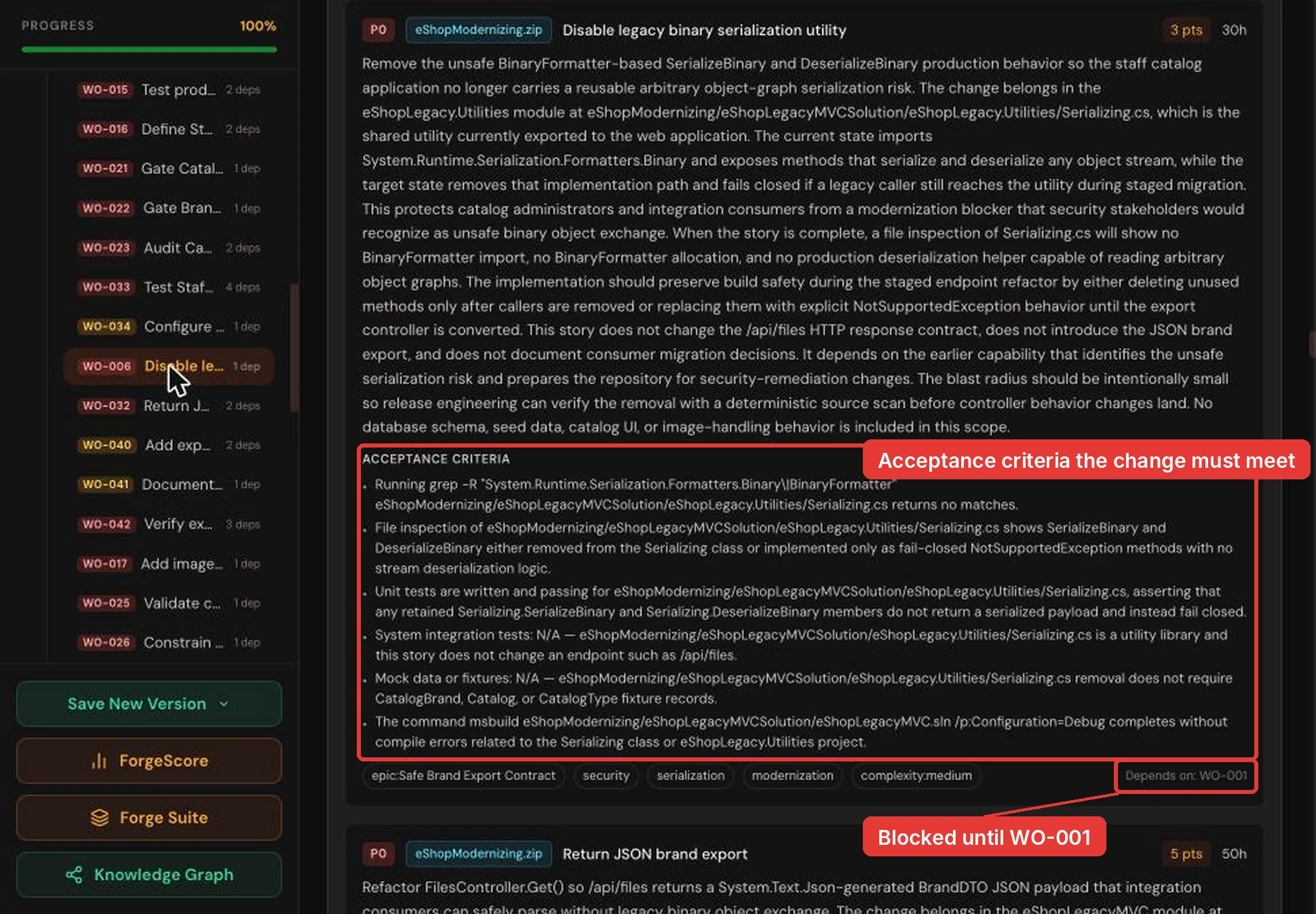
WO-006 in full: its acceptance criteria, an estimate of 3 points (about 30 hours), and its blocker, WO-001. In Forge: User Stories, then click WO-006.
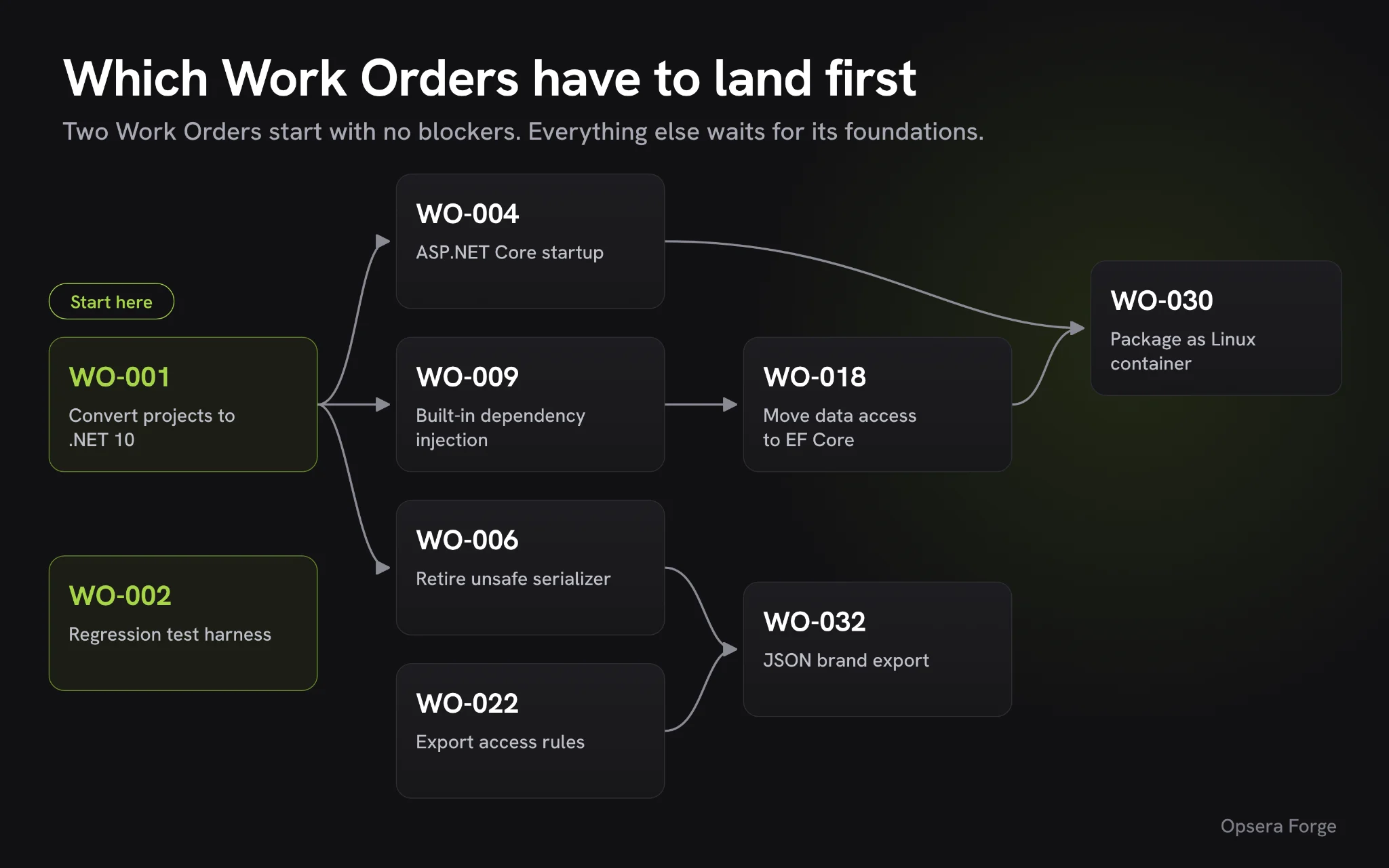
That last line is what keeps the plan safe. Forge orders the work by dependency, so the project conversion (WO-001) and the regression test harness (WO-002) come first, and later changes like the EF Core port and the container build wait until their foundations are in place.
Decisions the team makes before any code is written
Forge can order the work on its own, but a few choices depend on how the business runs, so only the team can make them. Forge flagged each one in the Work Orders and recorded the answer, so every later step builds the same thing.
- What the brand file download returns: the old download sent a binary file that only .NET could read. The team chose a plain JSON list with only each brand's
IdandBrand, andWO-041documents the change for anyone who used the old format. - How staff sign in: the legacy app had no sign-in at all. The team chose Microsoft Entra ID, with a catalog administrator role for the brand API and the export, and
WO-016,WO-021andWO-022put those checks in place. - What happens to Entity Framework 6: the team moved to EF Core, its modern replacement, including the SQL Server sequences the old app used to number new items (
WO-018andWO-029). - Where settings and secrets live:
Web.configvalues move toappsettings.json, and passwords and keys move to Key Vault (WO-008andWO-024). - Which old pieces to replace instead of convert: Autofac, the add-on the app used to connect its parts, gives way to the version built into .NET, and the old script bundling gives way to modern static files with Bootstrap 5.
- Which quirks to keep: the pager always says "Showing 10 of 12 products", even on a page with 2 items. The tests either keep that behavior or document a deliberate fix, so nothing changes accidentally.
Here is what the brand export decision looks like in code. This is the legacy FilesController, straight from the repo:
// Before: FilesController.cs on .NET Framework
var serializer = new Serializing();
var response = new HttpResponseMessage(HttpStatusCode.OK)
{
    Content = new StreamContent(serializer.SerializeBinary(brands))
};
And this is the response the team agreed on in WO-032. It returns application/json with only the two approved fields:
// After: GET /api/files
[
  { "Id": 1, "Brand": "Azure" },
  { "Id": 2, "Brand": ".NET" }
]
None of these are unusual for a .NET Framework migration. What changes with Forge is that each answer is written into the spec once, instead of being rediscovered in every pull request.
Running the Work Orders in Claude Code or Cursor
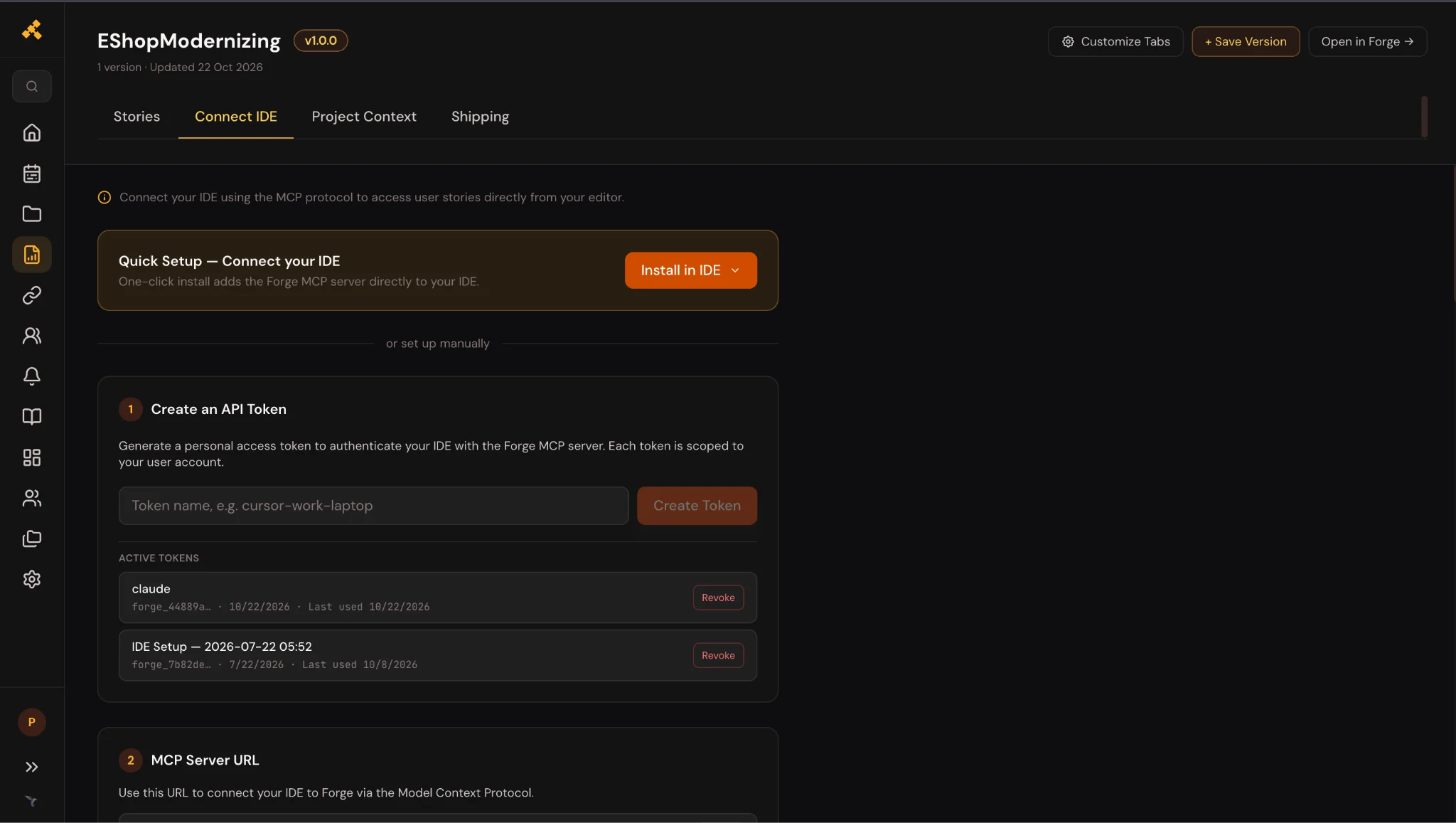
With those calls made, the developers take the Work Orders into the tools they already use. Forge connects to Claude Code, Cursor, and other AI coding editors over MCP, so the spec travels with the work instead of sitting in a document.
Every Work Order follows the same routine, so each of the 46 changes is checked the same way.
- The editor loads the Work Order, its acceptance criteria, and, for the first one, the approved architecture
- It studies the existing code and follows the steps in order, touching only the listed files
- It reviews its own changes, runs the tests, and checks each acceptance criterion with evidence
- Forge prepares a commit tagged with the Work Order number, and the evidence is posted back on the Work Order
- A person on the team reviews and approves the pull request before it merges
Here is the kind of change a single Work Order makes. WO-008 moves the app's settings out of Web.config:
<!-- Before: Web.config -->
<appSettings>
  <add key="UseMockData" value="false" />
  <add key="UseCustomizationData" value="false" />
</appSettings>
// After: appsettings.json
{
  "UseMockData": false,
  "UseCustomizationData": false
}
Testing the new app and packaging it as a Linux container
Once the code is in, the team proves the app still does what staff need. The tests come from the regression Work Orders (WO-002, WO-013, WO-014, and WO-015), which turn the staff task list into automated checks.
Forge's plan sets the bar for moving on:
- 100% of the critical security and workflow tests pass
- At least 98% of staff workflows behave the same as before
- The sample data still holds 12 items, 5 brands, and 4 types, and the hoodie's details still match
WO-030 then packages the app as a Linux container image, ready for the deployment pipeline.
Rolling out the .NET 10 app to staff in phases, with a rollback plan
With the app proven, the team switches users over in stages and keeps a way back the whole time. Forge's migration plan spells out each stage, along with its rollback.
- Parallel beta: the old and new apps run side by side, and a small group of staff tries the new one first
- Consumer sign-off: anyone who used the old brand download confirms the new JSON format works for them
- Production cutover: traffic moves over gradually, either by switching between two identical copies of the app or by sending a small share of users first, followed by two weeks of close monitoring
- Rollback: at every stage, users and API consumers can be routed straight back to the legacy app
- Decommission: the old Windows servers are retired only after a gate the team signs off (
WO-046)
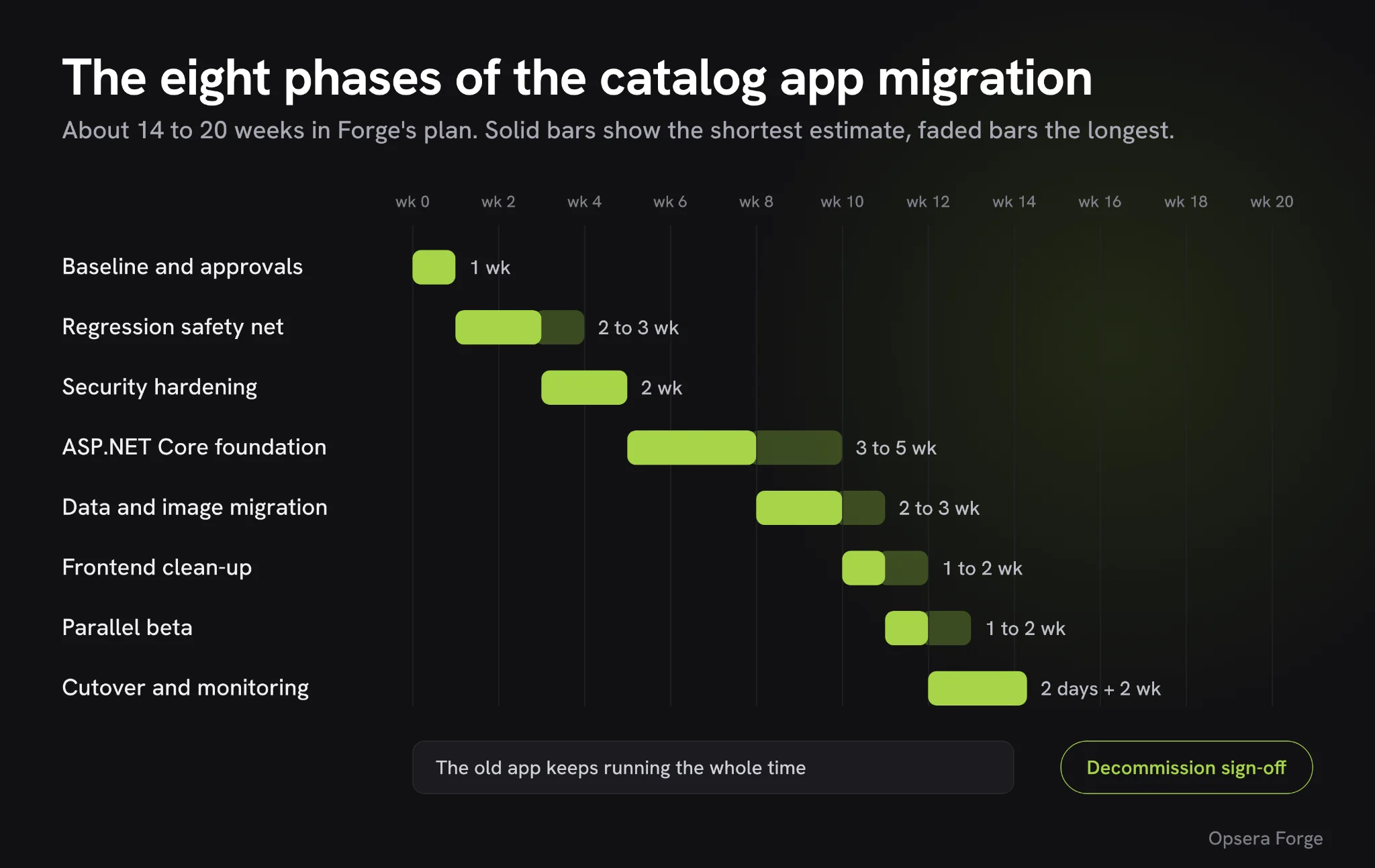
Forge's plan also puts the whole migration on a timeline of eight phases. Added up, they come to roughly 14 to 20 weeks, including two weeks of close monitoring after the switch.
| Phase | Estimated time | What happens |
|---|---|---|
| Baseline and approvals | 1 week | Confirm scope, owners, routes, sample data, and who uses the brand export |
| Regression safety net | 2 to 3 weeks | Add automated tests for every staff task, the APIs, sign-in, and image safety |
| Security hardening | 2 weeks | Agree on sign-in rules, the safe export format, image checks, and audit logging |
| ASP.NET Core foundation | 3 to 5 weeks | Build the new project, startup, routing, settings, and health checks |
| Data and image migration | 2 to 3 weeks | Move to EF Core, move images to cloud storage, check the sample data |
| Frontend clean-up | 1 to 2 weeks | Remove unused scripts and styles, keep form validation working |
| Parallel beta | 1 to 2 weeks | Run old and new apps side by side with a small group of staff |
| Cutover and stabilization | 2 days, then 2 weeks of monitoring | Switch traffic over gradually and watch errors, sign-ins and exports |
This is the part that lets a leader approve the move. Nothing about the switch depends on getting everything right on the first day.
Repeating the migration for the company's other .NET apps
Moving one app is a good start, but most companies have several apps like this one, so the bigger win is a path the team can repeat.
- Score every app first: a ForgeScore for each .NET Framework app gives the team a baseline, so it can start with the highest risk and the best return.
- Reuse what this project produced: the sign-in choice, the secrets setup, the container pipeline, and the test approach are already decided and written into the spec.
- Keep the same rhythm: each new app follows the same steps of score, spec, Work Orders, build and prove, then switches over in stages.
If you have a .NET Framework app you need to move, get a ForgeScore to see where it stands, or book a modernization assessment to walk through your own plan.
Questions.
How long does a migration like this take?
Forge's plan for this app runs in eight phases that add up to roughly 14 to 20 weeks, including two weeks of monitoring after cutover. Your own estimate comes from the ForgeScore and the Work Order breakdown for your code.
Do we need documentation of the old app before we start?
No. Forge works from the code itself and builds the spec from it. A short list of everyday staff tasks helps, because it becomes your acceptance tests.
Why .NET 10 and not .NET 8?
.NET 8 and .NET 9 reach the end of Microsoft support on November 10, 2026, while .NET 10 is a long-term support release supported to November 2028 (Microsoft .NET blog).
What happens to Entity Framework 6?
In this walkthrough, the team moved to EF Core, including the SQL Server sequences the old app used. Forge also supports a staged approach if a team wants to keep EF6 for a while, as long as the decision is recorded in the spec.
Can we keep using our current AI coding tools?
Yes. Forge is the orchestration layer above your models and coding assistants. It works with Claude Code, Cursor, GitHub Copilot, Windsurf, and others over MCP, and adds the spec and guardrails around them.
What if something breaks after the switch?
The plan keeps the legacy app running throughout the beta and cutover. Users and API consumers can be routed back to it at any stage until the decommission gate is signed off.